What Was Used Before OAuth 2.0 in Salesforce?
Before Salesforce adopted OAuth 2.0 as the primary standard for secure delegated access, a combination of older authentication and integration methods was used. Here’s how authentication and integration looked in the Salesforce ecosystem prior to OAuth 2.0:
Username and Password Authentication
- Direct Login in Applications:
Integrations and third-party apps would typically request the user’s actual Salesforce username and password to perform API operations. The app would store these credentials and pass them directly to Salesforce each time. - Risks:
- Users had to trust third-party apps with their primary credentials.
- If the app was compromised, all data accessible to that user’s credentials was at risk.
- No granular permissions or easy revocation per app.
Security Token
- What Is It?
In addition to the username and password, Salesforce often required an extra security token (a unique string) for API logins from untrusted networks. - How It Worked:
- Users would append the security token to their password (e.g., Password+Token) when logging in via external applications.
- Increased security for remote API logins, but did not solve the fundamental problem of sharing main credentials with third-parties.
IP Whitelisting
- Restricting Access:
Salesforce administrators could restrict logins and API access to known IP ranges, helping protect accounts when credentials were shared.
SAML and Single Sign-On (SSO)
- Early SSO:
Salesforce supported SAML-based Single Sign-On, allowing enterprise users to log in using their company credentials. - Limitations:
SAML mainly covered interactive user logins and did not provide a way for third-party apps to access Salesforce APIs on a user’s behalf without password sharing.
Salesforce Client Applications and App-Specific Passwords
- Custom Integration:
Some integrations relied on dedicated “integration user” accounts with restricted rights and hardcoded passwords. - App-Specific Passwords:
Though not as commonly used as in consumer services, the concept was similar — specific passwords for integrations.
Why OAuth 2.0 Changed Everything
- No Password Sharing: Third-party apps never see or store your main credentials.
- Scalable Permissions: App permissions can be fine-tuned and revoked without affecting the user’s account.
- Audit & Security: Improved tracking, monitoring, and control over app access.
Summary Table
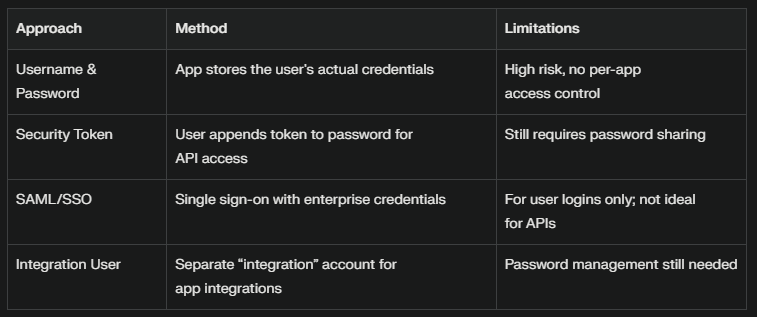
Salesforce’s move to OAuth 2.0 marked a shift from password-based integrations to a safer, more flexible, and user-controlled model for both user and app authentication.
1. What is OAuth 2.0, Really?
Imagine:
Salesforce is a huge theme park with magical doors to different rides and games. The park wants to keep everyone safe—no stranger danger!
- OAuth 2.0 is the rulebook and ticket system of the park.
- If someone (person or app) wants to use a ride (access data), they must show a special ticket (token).
- The ticket proves they have permission—without ever showing their secrets (passwords) to the ride operators.
Why?
If you had to tell your secret word (password) to every ride operator, someone might write it down and sneak in later! Instead, OAuth 2.0 lets you:
- Show a safe, temporary ticket.
- Save your real secret just for the main office.
2. Why Are There Different OAuth 2.0 Flows?
Every visitor is different; every ride is different:
- Some people walk in with mom/dad (user login).
- Some are delivery robots with a robot badge (apps with no user).
- Some come alone but have a letter from their school (signed app requests).
Each needs a tailored way to get their ticket. That’s why OAuth 2.0 describes multiple “flows”—special paths to get tickets in different situations.
3. Detailed Tour of OAuth 2.0 Flows in Salesforce (Park Entry Tricks)
| Flow Name | Who Uses It? | Theme Park Analogy | Salesforce Real-Life Example |
|---|---|---|---|
| Authorization Code | Regular visitors (users) | You show up at the park, prove who you are with your parents, then get a temporary wristband. | User logs in to a Salesforce-connected app and grants access. |
| Implicit | Quick, browser guests | You wave to the guard, he knows you, and gives you a quick wristband—no extra paperwork. | Single-page apps needing fast but limited access. |
| Client Credentials | Robots & maintenance workers | The cleaning robot uses a staff badge; no parent needed! | Automated daily data sync jobs. |
| Username-Password | Trustworthy VIPs | You shout your password over the fence—guard lets you in (not safe, only for VIPs). | Old-school integrations, not recommended now. |
| JWT Bearer | Kids with signed notes | You hand the guard a signed note from your parents: “Let my child play today!” | Secure internal system-to-Salesforce connections. |
| Device Flow | Smart device visitors | Your smart watch beeps at the guard, you use your phone to okay yourself, and the door opens! | Logging in to Salesforce from an Apple TV. |
4. Real Use Case Stories for Each Flow
Authorization Code Flow
- Cyrus uses a mobile app (built by his company) to see Salesforce reports.
- The app sends Cyrus to Salesforce’s login.
- Cyrus enters his username/password—Salesforce checks, then gives the app a temporary ticket to access his reports (only with his permission).
Implicit Flow
- Kim uses a web browser tool to export Salesforce contacts, no deep data needed.
- As soon as Kim clicks “log in,” the browser gets a quick, but less powerful, ticket.
Client Credentials Flow
- A robot cleans the park at night.
- The robot identifies itself with a special staff badge at the door; no one else needed.
- Used for system-to-system integration, like automated batch jobs moving data between Salesforce and another database.
Username-Password Flow
- Old trusted friend, Sam, shouts his secret password to a guard to enter.
- Not recommended anymore, because anyone overhearing could sneak in.
- Used only for legacy systems.
JWT Bearer Flow
- A school sends a signed permission slip: “Let Maya use the park for one hour.”
- The guard checks the signature, trusts the school, and lets Maya in.
- Used in secure integrations where systems use signed requests to get access.
Device Flow
- Ben’s smart fridge needs to update tasks in Salesforce.
- The fridge displays a code: Ben types this on his phone, okays the fridge, and now it can connect!
5. How Salesforce Handles These Tickets: Credentials and Trust
Named Credentials
- A lockbox in the guard’s office:
When Salesforce wants to call another service (like another park), it uses a named sticker from its lockbox—no one knows the sticker number but the guards.Example:
Salesforce calls an external weather API with stored OAuth stickers.
External Credentials
- Special stickers from trusted schools:
Kids who come from other schools have blue, yellow, or red stickers. The guard checks these, instead of their main office.Example:
Employees from another company log in using their Google or Microsoft badge.
External Auth Identity Providers
- Trusted headmasters from other schools:
The playground has a list of schools (identity providers) whose headmasters can issue trusted stickers.Example:
You set up Salesforce to trust logins from Okta, Google, or any corporate Single Sign-On system.
6. Putting It All Together: Park Security System
- OAuth 2.0:
The rules and process that let safe friends (apps, people, devices) enter the playground with the right kind of sticker. - Multiple Flows:
Different lines and gates keep everyone safe and make sure each friend gets only the right ride. - Named & External Credentials and Auth Providers:
Tools and badges that Salesforce uses to trust external helpers, partners, and friends—without ever letting anyone steal the keys.
Summary Table

Use Case: Connecting Salesforce to an External HR System Using Named Credential, External Credential, and External Identity Provider
Scenario Overview
Imagine your company wants Salesforce to fetch employee data from an external HR platform (like Workday or SAP SuccessFactors) using secure authentication. Your organization uses Google Workspace as the main identity provider for all platforms. Each component you mentioned is needed for a modern, secure integration.
Step-by-Step Use Case Breakdown
1. External Identity Provider
- Role: The trusted authority that manages your users’ digital identities (for example, Google Workspace or Azure AD).
- Why Needed? The external HR system trusts Google to prove who users are. Rather than manage separate usernames/passwords, users authenticate through Google.
- How It Works: When Salesforce or any user/application tries to authenticate to the external HR system, Google issues tokens that prove their identity.
2. External Credential in Salesforce
- Role: Defines in Salesforce how to authenticate when connecting out to a service that doesn’t use native Salesforce credentials.
- Why Needed? Allows Salesforce to connect to the HR system, presenting the right kind of token (such as an OAuth token issued by Google) to gain access securely.
- How It Works: The external credential config specifies that Salesforce must use Google’s tokens and describes how to request and manage these tokens.
3. Named Credential in Salesforce
- Role: A secure, managed configuration in Salesforce containing all details (endpoint, auth method, external credential) needed to make API calls to the external system.
- Why Needed? Centralizes and secures the endpoint and authentication settings so you never put secrets in Apex code or Flow configurations.
- How It Works: The named credential references the external credential for authentication and the external identity provider for token issuance, then points to the correct HR system endpoint.
How They Work Together – Real Example
| Component | What You Configure | What It Does |
|---|---|---|
| External Identity Provider (Google) | Set up as a SAML/OAuth/OpenID Connect provider | Issues tokens that Salesforce can use to authenticate with the HR system |
| External Credential | Maps to Google auth provider, sets scopes | Instructs Salesforce to fetch and use tokens from Google for callouts |
| Named Credential | Includes endpoint, ties to external credential | Lets Salesforce code, flows, or integration tools call the HR API securely |
End-to-End Flow
- Salesforce needs employee data.
- Salesforce uses the Named Credential to know the HR API endpoint and that it needs a Google token.
- The External Credential tells Salesforce how to get a valid token from Google (the Identity Provider).
- Google checks if Salesforce is allowed, then issues a token (on behalf of a user or a service).
- Salesforce uses the token and Named Credential to call the HR system API.
- The HR system checks the token (trusts Google)—then returns the requested data to Salesforce.
Use Case Benefits
- No hardcoded passwords or secrets in Salesforce code/configurations.
- Centralized, auditable security—easy to rotate/disable keys or tokens.
- Seamless, standards-based SSO integration using the enterprise’s main identity provider.
- Works for both user-level and automated (system-to-system) integrations.
This modern pattern is highly recommended for secure, scalable connections between Salesforce and external enterprise systems.
Key Point
You need all three:
- The External Identity Provider provides and validates user tokens.
- The External Credential lets Salesforce get and use those tokens.
- The Named Credential securely packages the endpoint and all authentication logic for use by Salesforce apps, Flows, or Apex.
Together, they form a secure bridge between Salesforce and trusted external services.
Interview Questions:
Part 1 – Question-Only List
- What is OAuth 2.0 and how is it different from OAuth 1.0?
- Which four core roles form the OAuth 2.0 framework?
- Why is OAuth preferred over direct username-password integrations in Salesforce callouts and log-ins?
- List every OAuth 2.0 authorization flow that Salesforce supports.
- Walk through the Authorization Code (Web Server) flow and name two production use-cases.
- Explain the User-Agent (Implicit) flow and when it is appropriate.
- Describe the Client Credentials flow and its typical Salesforce scenarios.
- Outline the Resource Owner Password Credentials flow and explain why it is discouraged for new work.
- Detail the JWT Bearer Token flow, including certificate requirements and common ETL use-cases.
- Summarize the SAML Bearer Assertion flow and how it differs from JWT Bearer.
- Explain the Device flow and give a Salesforce example that needs it.
- How do refresh tokens work in Salesforce, and what limits exist on active tokens per user?
- What is PKCE, and how does enabling it change the Web Server flow?
- Compare the api and full OAuth scopes in a Connected App.
- List the mandatory Connected-App settings for an OAuth integration (callback URL, digital signatures, etc.).
- What is a Named Credential and how does it simplify authenticated callouts?
- What are External Credentials and how do they interact with Named Credentials?
- Contrast Named Credential, External Credential and Auth Provider.
- Describe Salesforce’s token expiration / revocation rules and the 5-token rolling window.
- How do you keep client secrets secure in public (mobile / SPA) clients?
- Troubleshoot the common “invalid_grant – expired access/refresh token” error.
- How does IP whitelisting affect OAuth flows?
- Differentiate OAuth 2.0 from OpenID Connect in Salesforce SSO scenarios.
- What is an Asset Token flow and who uses it?
- What are custom OAuth scopes and when would you create one?
- How do app-level session-timeout policies override org defaults?
- How does the Device flow protect the user code while polling?
- Compare JWT Bearer vs Client Credentials for server-to-server integrations.
- List three best-practice hardening tips for any Salesforce OAuth implementation.
- What is the difference between Per-User and Named Principal identity types in Named Credentials?
Part 2 – Questions with Answers
Q1. What is OAuth 2.0 and how is it different from OAuth 1.0?
OAuth 2.0 is an open standard that issues short-lived access tokens so an application can call protected resources without ever handling the user’s password. Unlike OAuth 1.0, it drops complex cryptographic signatures and introduces multiple flows, refresh tokens and scopes, greatly simplifying developer experience while widening use-cases.
Q2. Which four core roles form the OAuth 2.0 framework?
- Resource Owner (user)
- Client (application)
- Authorization Server (Salesforce token endpoint)
- Resource Server (Salesforce REST/Bulk/etc. APIs)
Understanding these roles is foundational to mapping any flow.
Q3. Why is OAuth preferred over direct username-password integrations in Salesforce?
It removes the need to store or transmit credentials, allows per-app permission scoping, lets admins revoke a single app without disabling the user, and supports robust audit logging.
Q4. List every OAuth 2.0 flow that Salesforce supports.
- Authorization Code (Web Server)
- Authorization Code + PKCE
- User-Agent (Implicit)
- Device Authorization
- Client Credentials
- JWT Bearer Token
- SAML Bearer Assertion
- Resource Owner Password Credentials
- Asset Token
- Refresh Token
Q5. Walk through the Authorization Code (Web Server) flow and give two use-cases.
- Client redirects user to
/authorizewith client id + scopes. - User authenticates and grants access.
- Salesforce returns a short-lived code to the redirect URI.
- Backend exchanges that code (plus client secret or PKCE verifier) at
/tokenfor an access + optional refresh token.
Use-cases: a React front-end with secure Node.js backend, or an ISV SaaS dashboard that surfaces Salesforce data.
Q6. Explain the User-Agent (Implicit) flow.
Salesforce returns the access token directly in the URL fragment after login. No code exchange occurs; no refresh token is issued. It suits single-page apps that only need short-lived access and cannot store a secret.
Q7. Describe the Client Credentials flow.
A non-interactive client (e.g., nightly ETL) posts its client id and client secret to /token with grant_type=client_credentials and receives an org-wide access token. No user context is involved; permissions come from the Connected App’s integration user.
Q8. Outline the Resource Owner Password Credentials flow and explain why it is discouraged.
The client posts username, password + security-token and app credentials to /token. It breaks the core OAuth promise and should only be used in legacy, high-trust batch contexts because credentials are exposed to the client.
Q9. Detail the JWT Bearer Token flow.
- Client builds a JWT with claims
iss(consumer key),sub(user),aud(login URL) andexp. - Signs it with an X.509 certificate uploaded to the Connected App.
- POSTs the assertion to
/token?grant_type=urn:ietf:params:oauth:grant-type:jwt-bearer.
Salesforce validates the signature and returns an access token—ideal for server-to-server, headless ETL jobs.
Q10. Summarize the SAML Bearer Assertion flow.
Similar to JWT but the client creates a SAML assertion instead of JWT. It is chosen when an enterprise already issues SAML tokens and wants to leverage existing PKI without generating new certificates.
Q11. Explain the Device flow with a Salesforce example.
An input-constrained device (e.g., Smart TV Lightning App) hits /device/code, displays a user-code and verification URL. The user authorizes on another device; meanwhile the client polls /token until Salesforce returns the access token.
Q12. How do refresh tokens work in Salesforce, and what user-level limits exist?
The Connected App issues one refresh token per successful authorization. Salesforce enforces five active refresh tokens per user–app pair; the sixth issuance quietly revokes the oldest. Refresh tokens never expire unless revoked or the user resets their password.
Q13. What is PKCE and when should you turn it on?
Proof-Key for Code Exchange replaces the client secret with a one-time code_verifier + hashed code_challenge, stopping interception attacks on public clients (mobile/SPAs). Enable PKCE and un-tick “Require secret” to secure native or JavaScript apps.
Q14. Compare the api and full OAuth scopes.
api= REST/Bulk/Soap/Tooling access.full= everything the user can do via UI except offline access; it effectively combinesapi+ all other delegated scopes. Grant the minimal scope necessary.
Q15. List the mandatory Connected-App settings for any OAuth integration.
- Enable OAuth settings
- Set Callback URL (HTTPS)
- Choose scopes
- Optionally upload a certificate or enable PKCE
- Record the Consumer Key / Secret for server-side use.
Q16. What is a Named Credential and how does it simplify authenticated callouts?
It stores the endpoint URL and credential type (OAuth, JWT, AWS SigV4, etc.) so developers reference callout:My_NC instead of hard-coding tokens. It handles token refresh behind the scenes and passes security reviews.
Q17. What are External Credentials and how do they interact with Named Credentials?
External Credentials define how Salesforce should obtain tokens from an external Identity Provider (Auth Provider or custom). A Named Credential then points to that External Credential. This separation lets admins rotate secrets or swap providers without editing code.
Q18. Contrast Named Credential, External Credential and Auth Provider.
Auth Provider = template that knows how to talk OAuth/OpenID/SAML with a third-party.
External Credential = which principal (per-user or integration user) and what grant type to use.
Named Credential = final wrapper: endpoint + External Credential to execute callouts.
Q19. Describe Salesforce token expiration / revocation rules.
- Access tokens follow the session timeout in app policies (15 min–24 h by default).
- Refresh tokens survive until manually revoked, password reset, connected-app policy change, or the 5-token rolling window is exceeded.
Q20. How do you keep client secrets safe in public clients?
Avoid embedding secrets; use PKCE or the Device flow. Where a backend is unavoidable, store secrets server-side and exchange authorization codes server-to-server over TLS.
Q21. Troubleshoot “invalid_grant – expired access/refresh token”.
Likely causes: token replay after 5-token limit reached, user revoked app access, org IP/login-hour policies changed, or refresh token used on the wrong OAuth domain (login vs test). Regenerate authorization or migrate to JWT flow if frequent.
Q22. How does IP whitelisting affect OAuth flows?
Login and token endpoints will still issue codes, but API calls from disallowed IPs fail unless “Relax IP restrictions” is set in the Connected App. Conversely, org-wide login IP ranges also gate /authorize.
Q23. Differentiate OAuth 2.0 from OpenID Connect in Salesforce.
OAuth = authorization (who can call an API).
OpenID Connect layers an ID-token on top so relying parties can authenticate the user—used for SSO into Slack or Tableau.
Q24. What is the Asset Token flow?
Salesforce IoT and external assets (Heroku, MuleSoft) can request scoped tokens representing a physical asset instead of a user—rarely asked but listed for completeness.
Q25. What are custom OAuth scopes and when would you create one?
An admin can define a scope string that represents permission to an external service. The Connected App then requests it and downstream API gateways inspect it for granular access control.
Q26. How do app-level session-timeout policies override org defaults?
Connected App → Edit Policies → set “Session Timeout” and “Refresh Token Policy”. These values replace the org session length for any token issued by that app.
Q27. How does the Device flow protect the user code while polling?
The device receives an opaque device_code plus user-friendly user_code. Only the device_code is sent in polling; the user_code never leaves the screen, preventing token farming attacks.
Q28. Compare JWT Bearer vs Client Credentials for server-to-server work.
JWT flow signs every request with a key pair and can impersonate a specific user (sub). Client Credentials acts as the integration user tied to the Connected App. JWT is preferred when user-level field-level security or row-level visibility is required.
Q29. List three security hardening tips for any Salesforce OAuth integration.
- Use the least-privilege scope set, never default to full.
- Enforce PKCE or signed JWTs instead of storing client secrets in mobile apps.
- Monitor Connected-App login history and set token-refresh policies to “Immediately expire on logout” for high-risk apps.
Q30. What is the difference between Per-User and Named Principal identity types in Named Credentials?
Per-User: each Salesforce user runs the OAuth flow and owns their own refresh token—used for user-centric integrations like Google Drive.
Named Principal: one shared credential used by all code paths—ideal for backend batch jobs
 SFDCWallah
Leave a comment