1. Fundamental and Definition Questions
- What is Salesforce integration, and why is it necessary?
Salesforce integration is the process of connecting Salesforce with other systems, applications, or data sources to enable seamless data exchange and process automation. It’s necessary to eliminate data silos, enhance productivity, and provide a unified view of customer information. - What are the main benefits of integrating Salesforce with other platforms?
Integration improves workflow automation, enables real-time data access, reduces manual data entry, increases accuracy, and facilitates better decision-making. - Can you describe a real-world project where you implemented Salesforce integration?
Example: Integrating Salesforce with an ERP system to automatically sync order and inventory data, which reduced manual errors and improved order fulfillment speed.
2. Types and Patterns of Integration
- What are the different types of integrations possible with Salesforce?
- Data Integration: Synchronizing or migrating data.
- Process Integration: Automating workflows across systems.
- UI Integration: Merging interfaces from different systems.
- What are key Salesforce integration patterns?
- Request and Reply: The external system requests data and receives an immediate response.
- Fire and Forget: Data is sent without waiting for a response.
- Batch Data Synchronization: Periodic transfer of large data sets.
- UI Integration: Embedding external UI in Salesforce.
- Event-driven Integration: Actions based on events in real-time.
- What are the use cases for real-time vs. batch integrations?
Real-time is used for up-to-the-minute data accuracy (e.g., customer lookup). Batch is suitable for regular but not urgent data sync, such as nightly updates. - How does point-to-point integration differ from middleware?
Point-to-point means direct connections between two systems; middleware introduces an intermediary platform to manage, transform, and route data, improving scalability and reducing complexity.
3. Salesforce API Questions
- What APIs does Salesforce provide?
REST API, SOAP API, Bulk API, Streaming API, Tooling API. - When would you use REST API over SOAP API, and vice versa?
REST is preferred for lightweight, stateless integration and mobile use; SOAP is better for complex operations, strong typing, and enterprise constraints. - What are the differences between REST and SOAP in Salesforce integrations?
REST: Simpler, uses JSON/XML, suitable for web/mobile; SOAP: More robust, supports complex actions, uses XML only. - What is the Bulk API, and when should it be used?
It’s designed for handling large data volumes asynchronously. Use it for importing, exporting, or deleting thousands to millions of records.
4. Technical Implementation & Configuration
- What is a Connected App, and how does it facilitate integration?
A Connected App defines how external apps interact with Salesforce, including authentication, permissions, and security policies. - What are Named Credentials in Salesforce?
Named Credentials manage authentication and endpoint info securely, simplifying integration setup. - Role of middleware (e.g., MuleSoft) in Salesforce integration?
Middleware helps orchestrate, transform, and secure data movement between Salesforce and other systems, reducing custom code. - What is an External ID, and why is it important?
An External ID uniquely identifies records in an external system, aiding in upserts and data mapping during integration. - How do you use WSDL files in Salesforce integrations?
They define SOAP web services’ structure, enabling Salesforce to generate Apex classes for consuming or exposing web services. - What is web service flow in Salesforce?
This refers to using Salesforce flows to consume/expose external REST/SOAP web services without code.
5. Security, Authentication, and Authorization
- How do you secure integrations between Salesforce and external systems?
Use SSL/TLS, OAuth tokens, IP restrictions, named credentials, and field-level security. - Key differences between authentication and authorization in Salesforce integrations?
Authentication verifies identity (e.g., via OAuth), while authorization defines what actions/data a user can access after authenticating. - How does OAuth 2.0 work in Salesforce, and what are its main flows?
OAuth 2.0 lets apps securely obtain limited access to Salesforce on behalf of users. Main flows: Authorization Code, Username-Password, JWT Bearer, Client Credentials. - Difference between OpenID Connect and OAuth?
OAuth is for delegated authorization; OpenID Connect adds authentication (proving who the user is) on top of OAuth. - How do session management and data encryption play a role in integration security?
They protect against unauthorized access and ensure data confidentiality during transmission and storage.
6. Error Handling & Data Quality
- How do you ensure data integrity during Salesforce integration?
Use validation rules, field-level mapping, and rigorous data transformation. - Mechanisms for error handling and retries?
Implement error logging, retry strategies, dead-letter queues, and alerts for failures. - How do you handle duplicate or inconsistent data during integration?
Use deduplication logic, External IDs, and Salesforce duplicate management tools.
7. API Limits and Performance
- Key limits associated with Salesforce APIs?
Daily API call limits, concurrent request limits, payload size limits, and governor limits. - How to design scalable integrations for large data volumes?
Use Bulk API, optimize batch sizes, process data asynchronously, and use middleware for complex logic. - Optimizing integrations to avoid hitting governor and API limits?
Batch requests, cache data, minimize unnecessary API calls, and monitor consumption.
8. Scenario-Based and Problem-Solving Questions
- How would you integrate Salesforce with a payment gateway, ERP, or legacy system?
Use middleware or direct APIs, handle authentication securely, process transaction responses, and ensure robust error handling. - How would you synchronize customer data between Salesforce and an external CRM nightly?
Schedule batch jobs via middleware or scheduled Apex, use upserts with External IDs, and implement robust logging and notifications. - How would you retrieve thousands of records from Salesforce using APIs?
Use Bulk API for higher volumes or REST API with queryMore() for pagination. - Describe a time you solved a significant challenge during a Salesforce integration project.
Example: Troubleshooting a data sync issue caused by mismatched External IDs, resolved by improving mapping and implementing extra data validation rules.
9. Salesforce Integration Tools and Platforms
- What tools/platforms have you used for Salesforce integration?
MuleSoft, Informatica, Jitterbit, Dell Boomi—these manage connectivity, orchestration, data transformation, and monitoring. - Point-and-click integration tools available in Salesforce?
Salesforce Connect, External Services, Outbound Messaging, Apex Callouts, Named Credentials—some require minimal code. - How does Salesforce Connect enable integration with external data sources?
It offers federated access to external data in real time without storing data in Salesforce. - What is SoapUI and how is it involved in integration testing?
SoapUI is a tool for testing SOAP and REST web services by simulating requests/responses and verifying integration logic.
10. Architecture & Best Practices
- Main components of Salesforce integration architecture?
APIs, middleware, security/authentication mechanisms, error handling, logging, and data mapping. - Best practices to ensure integration success and maintainability?
Modular design, secure authentication, version control, automated testing, clear documentation, and robust monitoring. - How do you manage version control and deployment for integration development projects?
Use Git or other VCS, CI/CD pipelines (e.g., Salesforce DX, Jenkins), and maintain reusable components.
11. Advanced Concepts
- What are composite APIs and when would you use them?
Composite APIs allow you to bundle multiple requests into a single call, improving efficiency and reducing overhead. - What is Change Data Capture and how does it support integration?
Change Data Capture publishes real-time changes in Salesforce data, enabling external systems to subscribe and react to changes. - How do custom metadata types improve integration manageability?
They let you store configuration/data that can be referenced in code, enabling more flexible, maintainable integrations.
12. Project and Soft Skills
- How do you communicate integration requirements with business stakeholders?
Use clear diagrams, gather and clarify requirements, and maintain regular collaboration/updates to align on business needs. - How do you ensure cross-team collaboration during integration projects?
Schedule regular meetings, share technical documentation, leverage shared project tools (e.g., Jira), and promote open feedback culture.
13. Handling Salesforce API Limits and Callout Failures
What to Do When API Limits Are Reached
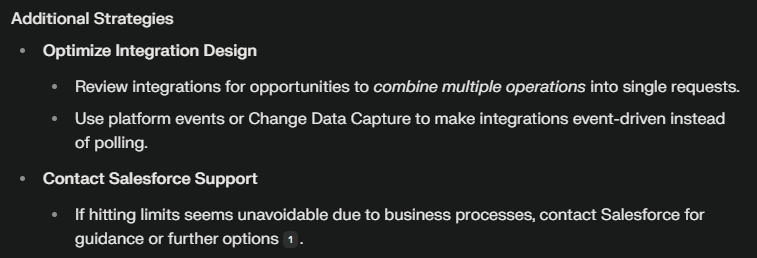
If your integration is regularly hitting Salesforce API limits (request limits, concurrency, or timeouts), you need to consider both technical and process optimizations:
- Reduce API Usage
- Stagger or Schedule Calls
- Schedule non-essential or high-volume data sync jobs to off-peak hours when other jobs are inactive, spreading usage throughout the day.
- Monitor and Alert
- Purchase Additional Capacity
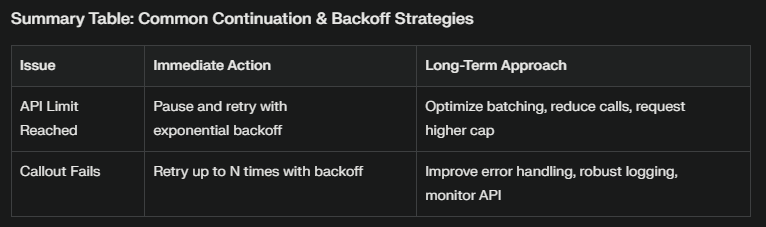
- Implement Retry Logic with Backoff
Example: Exponential Backoff
If you receive a 429 (Too Many Requests) response, wait a short time (e.g., 2 seconds), then double the delay each retry up to a maximum number of attempts.
What to Do If Callouts Keep Failing
Failed callouts (Apex HTTP callouts or external requests) could be caused by network errors, remote system unavailability, or Salesforce timeouts. Best practices include:
- Retry with Limit and Delay
- Catch and Handle Specific Exceptions
- Use Integration Retry Policies
- For more advanced needs (e.g., Salesforce Order Management), define custom retry and backoff policies directly in Salesforce for orchestrated connections
Example: Apex Retry Logic Pseudocode
Integer attempts = 3; Integer delayMillis = 5000;
while (attempts > 0) {
  try {
    // Your HTTP callout here
    break; // Exit if successful
  } catch (CalloutException ex) {
    attempts--;
    // Add delay (cannot use Thread.sleep in Apex, use asynchronous/batch processes)
  }
}
How OAuth 2.0 Works in Salesforce
OAuth 2.0 is an industry-standard protocol that lets applications (like mobile apps, web apps, or backend services) securely access resources in Salesforce on behalf of a user or the app itself—without needing to directly share passwords.
When a client app wants access, Salesforce issues an access token after verifying the user’s or app’s identity and permissions. The token is then used for making secure API calls.
Why Are There Different OAuth 2.0 Flows?
Each OAuth 2.0 “flow” addresses a unique scenario, based on app type, security needs, and where the app runs. The right flow ensures the balance between security and usability for different situations.
Key OAuth 2.0 Flows in Salesforce
| Flow | When to Use It | Example Use Case |
|---|---|---|
| Authorization Code | For server-based web apps; secure secret storage | A web portal lets users log in with their Salesforce |
| Username-Password | For highly trusted integrations; no user input | Automated backend data-sync where trust is ensured |
| JWT Bearer | For server-to-server (no user interaction) | Headless integration: system-to-system authentication |
| Client Credentials | App needs access to its own resources only | Backend process needing data from Salesforce itself |
Simple Explanation:
- User sign-in: Use Authorization Code (secure and interactive)
- Trusted service: Use Username-Password (only if you control everything)
- Automation, no user: Use JWT Bearer or Client Credentials
Why We Need Named Credentials, External Service, and External Credentials
These Salesforce tools secure, simplify, and standardize authentication with external services, making integrations easier to manage and safer to operate.
1. Named Credential
- What is it?
A secure way to store authentication details and endpoints for an external API within Salesforce. - Why use it?
- Avoid storing sensitive credentials in code
- Centralizes security and simplifies connection management
- Salesforce auto-manages token refresh (for OAuth)
- Real-Life Use Case:
Suppose your Salesforce org regularly calls a shipping carrier’s API to track packages. You create a Named Credential with the carrier’s URL and OAuth details. Your developers reference it in code or flows, never worrying about updating credentials or exposing secrets.
2. External Service
- What is it?
A declarative tool that allows admins to register external APIs via a schema (like an OpenAPI spec) and then use those APIs in flow automation or bot logic—without writing code. - Why use it?
- Automate business actions by calling external APIs from Salesforce Flows
- Point-and-click—no coding for most scenarios
- Real-Life Use Case:
Your sales reps need credit checks before confirming orders. You register your credit-check service as an External Service, map actions to Salesforce Flows, and now reps can run credit checks in one click—securely, within Salesforce.
3. External Credentials
- What is it?
Modern framework for securely managing various authentication types for external systems, extending Named Credentials by supporting more complex scenarios, like API key rotation or user-to-permission mapping. - Why use it?
- Support for sharing credentials across multiple endpoints
- Granular permission assignments (who can access external data)
- Store/reuse complex authentication data (like API keys or tokens)
- Real-Life Use Case:
Your org connects to several data providers using the same identity provider credentials. With External Credentials, you store these settings once, selectively grant access to certain users or integrations, and securely manage all callouts—no more setting up duplicate configs everywhere.
Recap: Putting It All Together
- Different OAuth 2.0 flows exist to address security, user experience, and app type (web, mobile, backend).
- Named Credentials, External Service, and External Credentials are Salesforce innovations to securely and efficiently integrate external systems—reducing risk and effort for admins and developers.
- Each tool has unique use cases—choose what fits your integration needs for access, automation, and security
 SFDCWallah
Leave a comment