




Trigger Context Variables
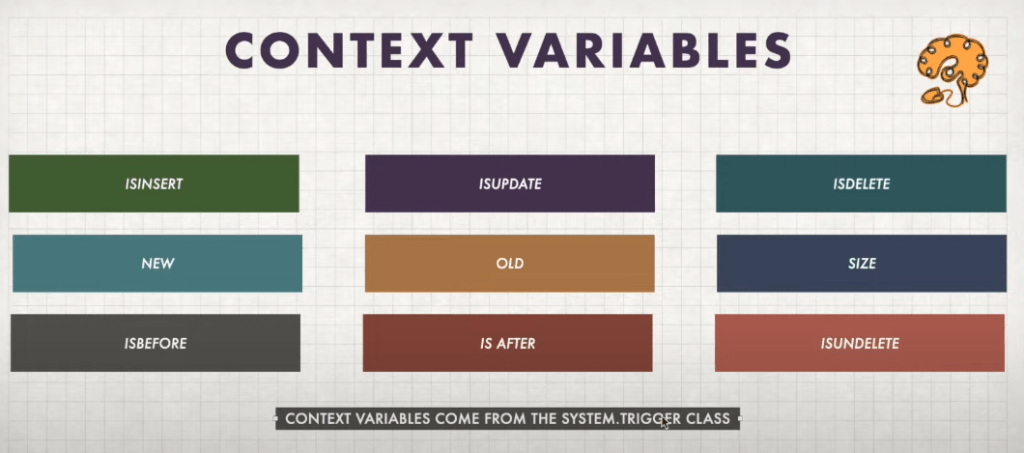
Trigger.new : Returns a list, which are ordered. If you have multiple loops over each item the trigger is operating on, the list returned by Trigger.new may be the better.
Trigger.newMap : Returns a map , which are unordered. if you have an ID of an object you need to do something with, using the map makes more sense as you can use newMap.get().
Otherwise you’d have to loop over all the elements in Trigger.new and look for a matching ID.
Difference between Trigger.new and Trigger.newMap:
Suppose you have a custom object Custom_obj__c
Trigger.New means it is a List<Custom_obj__c>
and
Trigger.NewMap means it is a Map<Id, Custom_obj__c>
In before insert context your Trigger.newMap will always be null because in before context records are not submitted to the database, so the Id is not generated yet. That’s why in before insert we don’t use Trigger.newMap But in After insert, Id is generated so we can use Trigger.newMap.
In case of before and after update, the Id has already been generated in the insert event. So we can use Trigger.newMap in before and after update.
Suppose Your code is like this in after insert case:
For example we have 200 accounts we are using Trigger.new to get the inserted AccountIds
So the for loop will run 200 times to add Account IDs to the set.
set<Id> accIds = new set<Id>();
for(Account acc : Trigger.new)
{
accIds.add(acc.id);
}
//query the contact records now from currently processed Account Ids
List<Contact> lstContact = [select id from contact where Accountid in : accIds];
Now When we use Trigger.newMap
Now we have no need a for loop because all the IDs are in Trigger.newMap.Keyset().
List<Contact> lstContact = [select id from contact where Accountid in : Trigger.newmap.Keyset()];
Execution time will be reduced using Trigger.newMap in comparison to Trigger.new.
Trigger.old : Returns a list of the old versions of the sObject records. Note that this sObject list is only available in update and delete triggers.
Trigger.oldMap : A map of IDs to the old versions of the sObject records.Note that this map is only available in the update and delete triggers.
Suppose you have a custom object Custom_obj__c
Trigger.old means it is a List<Custom_obj__c>
and
Trigger.oldMap means it is a map<Id, Custom_obj__c>
Apex Triggers Interview Questions :
- Write a trigger to automatically distribute the total budget of an Account among it’s related opportunities whenever the total budget field on the account is updated.
- Write an apex trigger to identify and update the most recent subscriber for each account.
- Write a trigger that stops users from editing an account record if it was updated in the past hour. If less than one hour has passed since the last update, show an error message and block the update.
- Write a trigger to prevent multiple opportunity creations for the same account within a day or a single transaction
- Write a trigger to prevent the deletion of related contacts when their parent account is deleted.
- Write a scenario to update the capacity of an event based on it’s distributions and set the status of the event distribution to waiting if the capacity is insufficient.
- Write a trigger to automatically assign available beds to waiting patients based on priority.
- When a new contact is added to an account with the type field set to premium, a case should be automatically created. The case should:
- Include the contact’s name in the description field.
- Be assigned the account owner
- Show min & max salary of employee records on parent company record.
- Update the parent account field with the opportunity name that has the highest amount.
- Enforce single primary contact on account.
- Automatically close opportunities with probability greater than 70% when checkbox is checked on Account.
- Trigger to count number of OpptyLineItems related with an opportunity and display the count on Account’s custom field.
- Update task record description if opportunity stage name is updated, if there’s no task record then create it.
- Trigger to count OpptyLineItem whose list price is greater than 50K related with opportunity and display that count on account custom field.
- Calculate number of cases for each account based on their status (New, working,escalated)
- Update account rating according to number of closed cases related to account.
- When the checkbox assign manager is checked, automatically assign a manager to user based on their team.
- When escalation required checkbox gets checked for a case on an account, a follow up task is automatically created for the primary contact on Account.
- Write an apex trigger to create a related contact whenever the create contact checkbox is checked on Account updating or insertion.
- When the account gets updated, send an email to the account’s owner with the details of contact modified between the last update and current update of account.
- Whenever an opportunity is created or updated with amount greater than 10K then send an email to the record owner.
- Write a trigger when a case is created and has an email in suppliedemail field check if the same email is present in the email field of any contact. It present, link that case to the contact else create a new contact and link it to the case.
- Write a trigger that creates a task and sends an email to the account owner whenever a case is deleted from an account.
- Write a trigger to calculate the highest time for which the order stayed in a particular stage.
- Write a trigger to manage account sharing with secondary owners. The trigger should grant access to the secondary owner when an account is created and updated and ensure that access is transferred to the secondary owner. Removing access for the old owner and granting it to the new one.
Some Other Practice Interview Questions:
- Whenever a Task is created, set the Priority to High
- Whenever a Lead record is updated, set the Lead Status to Working-Contacted
- Whenever a Case is created & Case Origin is Phone, Set Priority as High, else set Priority as Low
- Whenever a Lead is updated and Industry is Healthcare, set Lead Source, SIC Code and Primary
- Whenever an Opportunity is Closed Won, create a Task for the Opportunity Owner to split revenue
- When a Lead record is created, create a Task for the Lead Owner to follow up with the Customer
- If Opportunity Stage is Modified, update Opportunity Amount
- If a Contact is created without a parent Account, do not allow user to create the contact record
- If an Account is updated and Ownership is set to Private, do not allow user to save the record
- Every time an account website is updated, update the website field on all its child contacts
- Create Contact records based on Create N Contacts field on the Account record
- Do not allow Lead deletion if the status is Working Contacted
- As soon as an Opportunity is deleted, create a Task for the Opportunity’s parent Account Owner
- Do not allow contact creation if a contact already exists with the same last name, email & phone
- As soon as Opportunity is Closed Lost, remove all Opportunity Team Members from the Opportunity
- Allow Case Deletion only by System Admin users
- Share the contact record with a public group as soon as a record is created
- As soon as Opportunity Stage reaches Needs Analysis, add all users of role Opportunists to the Team
- Whenever a new Task is assigned to a Contact, increment the Number of Tasks field value by 1
- Send an email to the Account Owner when email or phone of a child contact is modified
- Whenever a Contact record is created, copy BillingAddress of Account to MailingAddress on Contact
- Allow updating the Task record only if the parent Contact’s Account has the Permission checked
- Do not allow Contact association if Max Contacts Allowed value is exceeded on the Account record
- Whenever Create N Locations field is updated, add or delete locations record under a contact record
- If an Opportunity is Closed Won, send email to opportunity owner, account owner & team members
- Set the Account Owner’s Name as the Sales Rep field value when an Account is created
- Do not allow a user to modify the Lead record if the Lead is created before 8 days from today
- When the Opportunity Stage is changed to a specific stage, create a Reminder Task
- When an account record is restored from the bin, update its name, prefix it with “Restored” keyword
- Use Async apex to update related contacts when parent account industry is changed to Biotechnology
Learn more in details in the below video:
More Related Blogs :
 SFDCWallah
Leave a comment