
What is Salesforce?
Salesforce is like a big digital notebook where companies store information about their customers, products, and deals. It helps businesses keep track of everything they need to run smoothly.
What are Triggers?
Imagine you have a magic alarm clock. Every time something specific happens (like the time reaches 7:00 AM), the alarm goes off, and it does something for you (like playing your favorite song). In Salesforce, triggers are like those magic alarms. They “trigger” when certain events happen, like when a record is created, updated, or deleted.
For example:
- If someone creates a new customer record, a trigger can automatically send an email to welcome them.
- If a product price is updated, a trigger can update all related invoices.
Why Do We Need This System?
The system in the diagram is designed to make triggers easier to manage and more organized. Here’s why:
- Keeping Things Organized :
- Imagine you have a lot of magic alarms, and each one does something different. Without a system, it would be chaos! This system helps organize all the triggers so developers know exactly what each one does and how it works.
- Avoiding Messy Code :
- Sometimes, when developers write code for triggers, it can get really messy. This system provides a clear structure, so the code is neat and easy to understand.
- Making Changes Easier :
- If you want to change how a trigger works, it’s much easier when everything is well-organized. You don’t have to dig through a pile of code to find the right part.
- Preventing Mistakes :
- With a structured system, developers are less likely to make mistakes. The framework guides them on what to do and ensures they follow best practices.
How Does This System Work?
Let’s walk through the diagram step by step:
- Start : Something happens in Salesforce, like a record being inserted, updated, or deleted.
- Trigger Exists? : The system checks if there’s a trigger set up for this event.
- If no trigger exists, the process ends.
- If a trigger exists, the system continues.
- TriggerFactory : This is like a factory that creates a special dispatcher (a helper) for the trigger. The dispatcher knows what kind of event happened (e.g., insert, update, delete).
- TriggerDispatcher : This is the helper that decides what actions to take based on the event. For example:
- If a record is inserted, it might call a “beforeInsert” handler.
- If a record is updated, it might call a “beforeUpdate” handler.
- Handlers : These are like little workers who do specific tasks. For example:
- A “BeforeInsertHandler” might check if the new record has all the required information before it’s saved.
- An “AfterDeleteHandler” might clean up any related data after a record is deleted.
- Interfaces : These are like rules that everyone must follow. For example:
- All handlers must implement the
ITriggerHandlerinterface, which means they must have certain methods (likemainEntryandinProgressEntry).
- All handlers must implement the
Who Does What?
- Framework : Provides the basic structure and rules (like interfaces and base classes).
- Developers : Write the specific handlers (like
BeforeInsertHandler,AfterUpdateHandler) to handle different events.
Why Is This Important for Salesforce Developers?
- Consistency : Everyone follows the same rules, so the code looks similar across different projects.
- Efficiency : Developers don’t have to reinvent the wheel every time they create a new trigger. The framework provides a solid foundation.
- Scalability : As the system grows, it’s easier to add new triggers without breaking existing ones.
- Maintenance : When something goes wrong, it’s easier to fix because the code is well-organized.
Summary
Imagine you’re building a robot army to help you with chores. Each robot has a specific job, like cleaning your room or feeding your pet. But if you just let them roam around randomly, they might trip over each other or forget what to do.
This system is like a set of instructions for the robots. It tells each robot exactly what to do and when to do it. It keeps everything organized, so your robot army works smoothly without making a mess.
In Salesforce, triggers are like those robots. This system helps developers build and manage triggers in a way that’s organized, efficient, and easy to understand.
Final Answer
This system helps Salesforce developers organize and manage triggers efficiently, making the code cleaner, easier to maintain, and less prone to errors.
Let’s walk through a step-by-step explanation of how this Salesforce Trigger Framework works, using a real-world example that you can easily understand and explain to others — even kids!
🎯 Goal:
We want to automatically update a customer’s status in Salesforce when they make a new purchase.
Let’s say we have an object called Customer__c, and another called Order__c. Every time a new Order__c is created, we want to update the related Customer__c to say:
“This customer has made a purchase.”
🧱 Step 1: The Trigger Fires
📌 What happens:
When a new Order is created (inserted), Salesforce runs the trigger.
🧒 Analogy:
Think of the trigger like a motion sensor . When someone walks in front of it (i.e., creates a new order), the light turns on (i.e., the trigger runs).
🧾 Example:
trigger OrderTrigger on Order__c (after insert) {
TriggerFactory.createDispatcher().run();
}
This trigger says:
“When a new order is created, call the TriggerFactory and let it handle the rest.”
🏭 Step 2: TriggerFactory Creates the Dispatcher
📌 What happens:
The TriggerFactory looks at what kind of event is happening (like after insert) and creates the right kind of dispatcher to handle it.
🧒 Analogy:
The TriggerFactory is like a robot builder . It knows what kind of robot (dispatcher) is needed for the job.
🧾 Example:
public class TriggerFactory {
public static ITriggerDispatcher createDispatcher() {
return new OrderTriggerDispatcher();
}
}
This says:
“For this Order trigger, we need an
OrderTriggerDispatcher.”
🧠 Step 3: Dispatcher Runs the Right Handler
📌 What happens:
The OrderTriggerDispatcher knows what to do when different events happen. For example:
- When a new order is inserted → run
handleAfterInsert - When an order is updated → run
handleAfterUpdate
🧒 Analogy:
The dispatcher is like the robot boss . It tells each robot what to do depending on the situation.
🧾 Example:
public class OrderTriggerDispatcher implements ITriggerDispatcher {
public void run() {
if (Trigger.isAfter && Trigger.isInsert) {
new OrderAfterInsertHandler().handle();
}
}
}
This says:
“If this is an
after insert, call theOrderAfterInsertHandler.”
👷 Step 4: Handler Does the Real Work
📌 What happens:
The OrderAfterInsertHandler now runs the code that actually does something useful , like updating the related customer.
🧒 Analogy:
The handler is like the worker robot who actually does the task — like updating the customer status.
🧾 Example:
public class OrderAfterInsertHandler {
public void handle() {
List newOrders = (List)Trigger.new;
Set customerIds = new Set();
    for (Order__c order : newOrders) {
        if (order.Customer__c != null) {
            customerIds.add(order.Customer__c);
        }
    }

    List<Customer__c> customersToUpdate = [
        SELECT Id, Status__c FROM Customer__c WHERE Id IN :customerIds
    ];

    for (Customer__c c : customersToUpdate) {
        c.Status__c = 'Has Made Purchase';
    }

    update customersToUpdate;
}
}
This says:
“Find all the customers who made a new order, and update their status to ‘Has Made Purchase’.”
🛠️ Step 5: Framework & Interfaces Keep Everything Consistent
📌 What happens:
All handlers and dispatchers follow the same rules (interfaces) so the code is neat and reusable.
🧒 Analogy:
Everyone in the robot factory uses the same blueprint, so all robots work the same way.
🧾 Example:
public interface ITriggerDispatcher {
void run();
}
public interface ITriggerHandler {
void handle();
}
This ensures:
- Every dispatcher has a
run()method. - Every handler has a
handle()method.
🧼 Step 6: Clean and Maintainable Code
📌 Why it’s better:
- No messy code in the trigger.
- Easy to add new logic later.
- Easier for other developers to understand and fix.
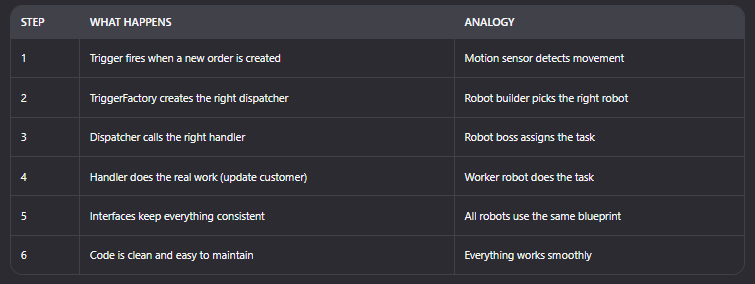
🔚 Final Answer:
This system helps Salesforce developers organize their code so that when something happens (like a new order), the right code runs in a clean and predictable way. It’s like building a robot army where every robot knows exactly what to do.

 SFDCWallah
Leave a comment