


1. Child to Parent Relationship
Q: How do you query a parent field from a child object in SOQL?
A: Use the relationship name followed by a dot and the parent field.
Example: SELECT Name, Account.Name FROM Contact
Q: How do you traverse multiple levels in a child-to-parent relationship?
A: You can chain relationship fields.
Example: SELECT Name, Account.Owner.Name FROM Contact
2. Parent to Child Relationship
Q: How do you query child records from a parent object in SOQL?
A: Use a subquery with the child relationship name.
Example: SELECT Name, (SELECT LastName FROM Contacts) FROM Account
Q: Can you filter child records in a parent-to-child query?
SELECT Name, (SELECT LastName FROM Contacts WHERE Email != null) FROM Account
Q: Can we have multiple child query in a parent-to-child query?
A: Yes
Example : SELECT
Id, Name,
(SELECT Id, LastName FROM Contacts),
(SELECT Id, Amount FROM Opportunities)
FROM Account
WHERE Id = ‘001XXXXXXXXXXXX’
3. LIKE and _ (Underscore) in SOQL
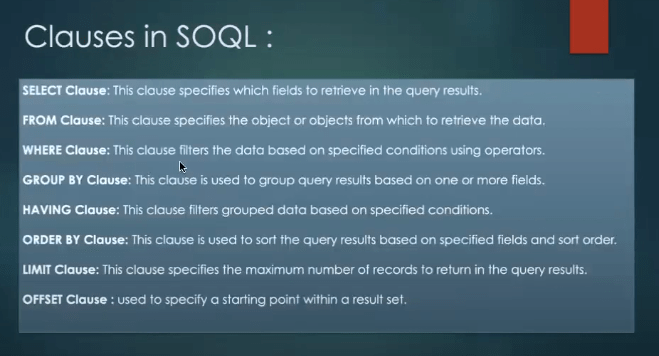
Q: What does the LIKE operator do in SOQL?
A: Used for pattern matching with wildcards (% for any number of characters, _ for one character).
Q: How would you query all contacts whose name starts with ‘A’ and has exactly 5 letters?
A: Use LIKE with _ wildcard.
Example: SELECT Name FROM Contact WHERE Name LIKE ‘A____’
4. IN Operator
Q: What is the purpose of the IN operator in SOQL?
A: To filter records where a field matches any value in a list.
Example: SELECT Name FROM Account WHERE Industry IN (‘Healthcare’, ‘Finance’)
5. AND, OR, NOT, and != Operators
Q: How do you combine multiple conditions in SOQL?
A: Use AND, OR, and NOT.
Example: SELECT Name FROM Contact WHERE LastName != ‘Smith’ AND Email != null
Q: How do you use parentheses to control logical precedence in SOQL?
A: Parentheses group conditions.
Example: SELECT Name FROM Contact WHERE (LastName = ‘Smith’ OR LastName = ‘Doe’) AND Email != null
6. LIMIT and OFFSET
Q: What does the LIMIT clause do in SOQL?
A: Limits the number of records returned.
Example: SELECT Name FROM Account LIMIT 10
Q: How can you implement pagination using LIMIT and OFFSET?
A: Use LIMIT and OFFSET together.
Example: SELECT Name FROM Account LIMIT 10 OFFSET 20 // 3rd page of 10 records
7. GROUP BY and HAVING
Q: What is the purpose of GROUP BY in SOQL?
A: Used to group records by one or more fields for aggregation.
Example: SELECT Industry, COUNT(Id) FROM Account GROUP BY Industry
Q: What is the difference between WHERE and HAVING in SOQL?
A: WHERE filters records before grouping, HAVING filters after aggregation.
Example: SELECT Industry, COUNT(Id) FROM Account GROUP BY Industry HAVING COUNT(Id) > 5
8. ORDER BY
Q: How do you sort results in SOQL?
A: Use ORDER BY.
Example: SELECT Name FROM Account ORDER BY Name
Q: How do you sort by multiple fields in SOQL?
A: List fields separated by commas.
Example: SELECT Name, CreatedDate FROM Account ORDER BY Name ASC, CreatedDate DESC
9. DESC and ASC
Q: What do ASC and DESC keywords do in SOQL?
A: Define the sort order: ASC (ascending), DESC (descending).
Example: SELECT Name FROM Account ORDER BY Name DESC
Q: Can you mix ASC and DESC in the same ORDER BY clause?
A: Yes.
Example: SELECT Name, CreatedDate FROM Account ORDER BY Name ASC, CreatedDate DESC
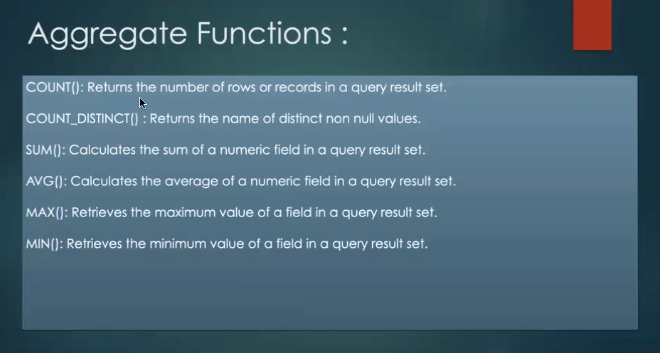
10. Aggregate Functions
Q: List the aggregate functions available in SOQL.
A: COUNT(), COUNT_DISTINCT(), SUM(), MAX(), MIN(), AVG()
Q: How do you count the number of unique account names?
A: Use COUNT_DISTINCT().
Example: SELECT COUNT_DISTINCT(Name) FROM Account
11. Bind Variables
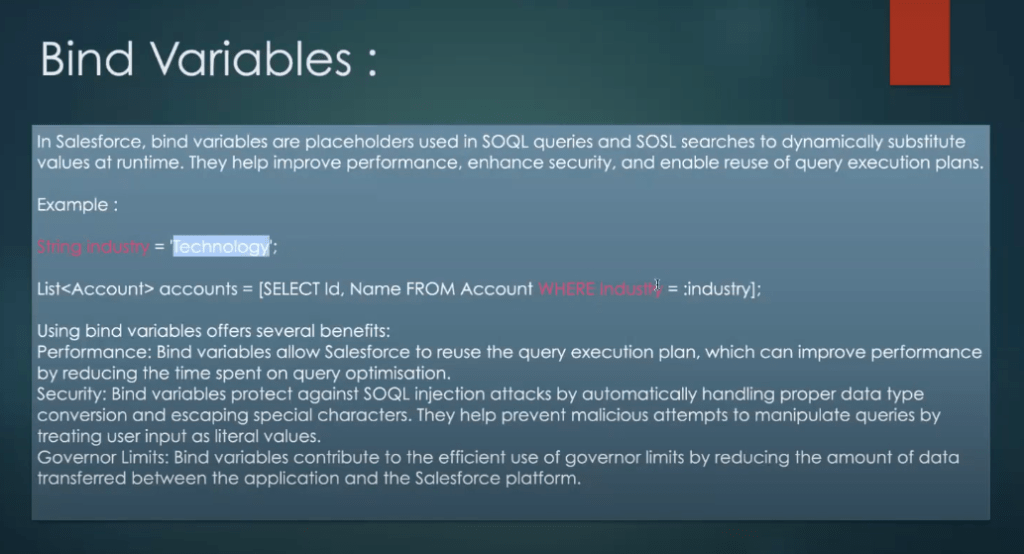
Q: What is a bind variable in SOQL?
A: A variable used in a query to dynamically insert values.
Example in Apex:
String name = ‘Acme’;
Account acc = [SELECT Id FROM Account WHERE Name = :name];
Q: Can you bind a list of IDs in a SOQL query?
A: Yes.
Example:
List ids = new List{‘001000000000001’, ‘001000000000002’};
List accs = [SELECT Name FROM Account WHERE Id IN :ids];
12. SOQL for Loop
A: Efficiently process large result sets using chunking.
Example:
for (Account acc : [SELECT Name FROM Account]) {
System.debug(acc.Name);
}
Q: What is the advantage of using SOQL for loops over a regular list assignment?
A: SOQL for loops automatically handle query chunking and governor limits.
13. SOSL Query
Q: What is SOSL used for?
A: Search across multiple objects and fields for text.
Example: FIND ‘salesforce’ IN ALL FIELDS RETURNING Account(Name), Contact(FirstName, LastName)
Q: Can SOSL be used in Apex triggers?
A: Yes, but it’s not recommended due to performance concerns.
Q: What is the main difference between SOQL and SOSL?
A: SOQL is for querying specific objects; SOSL is for global text search across objects.
Q: Can SOSL be used to query specific records by ID?
A: No. SOSL searches for text patterns, not specific IDs.
15. Dynamic SOQL
A: SOQL built as a string at runtime.
Example:
String query = ‘SELECT Name FROM Account WHERE Industry = \” + industry + ‘\”;
List accs = Database.query(query);
Q: What are the risks of using dynamic SOQL?
A: Risk of SOQL injection if not sanitized properly.
16. SOQL Injection
Q: What is SOQL injection?
A: A security vulnerability where malicious users manipulate SOQL strings.
Q: How do you prevent SOQL injection in Apex?
A: Use bind variables or sanitize input using String.escapeSingleQuotes().
String safeInput = String.escapeSingleQuotes(userInput);
String query = ‘SELECT Name FROM Account WHERE Name = \” + safeInput + ‘\”;
17. Date Functions in SOQL with Examples
SOQL provides built-in date literals and functions to filter records based on date/time fields. These are commonly used in the WHERE clause.
TODAY | Today (current day) |
YESTERDAY | Yesterday |
TOMORROW | Tomorrow |
LAST_WEEK | Last week |
THIS_WEEK | Current week |
NEXT_WEEK | Next week |
LAST_MONTH | Last month |
THIS_MONTH | This month |
NEXT_MONTH | Next month |
LAST_N_DAYS:n | Last n days |
NEXT_N_DAYS:n | Next n days |
LAST_N_WEEKS:n | Last n weeks |
NEXT_N_WEEKS:n | Next n weeks |
THIS_YEAR | This year |
LAST_YEAR | Last year |
🔍 Example SOQL Queries Using Date Literals
1. Get Tasks due today:
SELECT Id, Subject
FROM Task
WHERE ActivityDate = TODAY
2. Get Opportunities created in the last 30 days:
SELECT Id, Name
FROM Opportunity
WHERE CreatedDate = LAST_N_DAYS:30
3. Get Events happening this week:
SELECT Id, Subject
FROM Event
WHERE StartDateTime = THIS_WEEK
4. Get Contacts modified yesterday:
SELECT Id, FirstName, LastName
FROM Contact
WHERE LastModifiedDate = YESTERDAY
⏰ Time Zone Consideration
All date literals like TODAY, YESTERDAY, etc., are evaluated in the current user’s time zone . To avoid confusion in multi-timezone environments:
- Use
DateTime.newInstanceGmt()in Apex for UTC comparisons. - Use formulas or reports with
convertTimezone()if needed.
⚠️ SOQL Injection – What is it? How to prevent it?
❌ What is SOQL Injection?
It’s a security vulnerability where a malicious user manipulates input values to alter the intended logic of a SOQL query.
💣 Example of SOQL Injection
Assume you’re dynamically building a query from user input:
String query = ‘SELECT Id, Name FROM Account WHERE Industry = \” + industryVar + ‘\”;
List results = Database.query(query);
If industryVar is set to: ‘ OR Name != ‘ ‘
The final query becomes: SELECT Id, Name FROM Account WHERE Industry = ‘ ‘ OR Name != ‘ ‘
✅ How to Prevent SOQL Injection
1. Use Binding Variables
String industry = ‘Technology’;
List accs = [SELECT Id, Name FROM Account WHERE Industry = :industry];
2. Escape User Input
If using dynamic SOQL, escape single quotes:
String safeInput = String.escapeSingleQuotes(userInput);
String query = ‘SELECT Id FROM Account WHERE Name = \” + safeInput + ‘\”;
3. Validate Input
Check against known values (e.g., picklist values, whitelists).
4. Avoid Concatenating Raw Strings
Never build queries directly from untrusted sources.
👤 WITH USER MODE vs WITH SECURITY_ENFORCED in SOQL
📌 Overview
These clauses control how field-level and object-level permissions are enforced in SOQL queries executed in Apex.
✅ WITH USER MODE
- Respects the current user’s CRUD and FLS permissions.
- Used by default in Apex classes without
with sharingorwithout sharing. - If the user doesn’t have access to a field or object, the query fails.
Example : List accs = [SELECT Id, Name, Custom_Field__c FROM Account LIMIT 10 WITH USER MODE];
If the user can’t see Custom_Field__c, the query throws an error.
✅ WITH SECURITY_ENFORCED
- Introduced in Winter ’20 .
- Enforces both object-level and field-level security .
- Throws a readable exception if any field or object isn’t accessible.
- Useful in Aura/LWC components , Flows, and APIs where you want secure but meaningful errors.
List accs = [SELECT Id, Name, Custom_Field__c FROM Account LIMIT 10 WITH SECURITY_ENFORCED];
If Custom_Field__c is not visible, the query throws:
System.QueryException: In field: Custom_Field__c – no access

Qwen3-235B-A22B5:17 pm
Here’s a detailed explanation of your three topics:
📅 Date Functions in SOQL with Examples
SOQL provides built-in date literals and functions to filter records based on date/time fields. These are commonly used in the WHERE clause.
✅ Common Date Literals in SOQL
TODAY | Today (current day) |
YESTERDAY | Yesterday |
TOMORROW | Tomorrow |
LAST_WEEK | Last week |
THIS_WEEK | Current week |
NEXT_WEEK | Next week |
LAST_MONTH | Last month |
THIS_MONTH | This month |
NEXT_MONTH | Next month |
LAST_N_DAYS:n | Last n days |
NEXT_N_DAYS:n | Next n days |
LAST_N_WEEKS:n | Last n weeks |
NEXT_N_WEEKS:n | Next n weeks |
THIS_YEAR | This year |
LAST_YEAR | Last year |
🔍 Example SOQL Queries Using Date Literals
1. Get Tasks due today:
sql
1
2
3
⌄
SELECTId, Subject
FROMTask
WHEREActivityDate=TODAY
2. Get Opportunities created in the last 30 days:
sql
1
2
3
⌄
SELECTId, Name
FROMOpportunity
WHERECreatedDate=LAST_N_DAYS:30
3. Get Events happening this week:
sql
1
2
3
⌄
SELECTId, Subject
FROMEvent
WHEREStartDateTime=THIS_WEEK
4. Get Contacts modified yesterday:
sql
1
2
3
⌄
SELECTId, FirstName, LastName
FROMContact
WHERELastModifiedDate=YESTERDAY
⏰ Time Zone Consideration
All date literals like TODAY, YESTERDAY, etc., are evaluated in the current user’s time zone . To avoid confusion in multi-timezone environments:
- Use
DateTime.newInstanceGmt()in Apex for UTC comparisons. - Use formulas or reports with
convertTimezone()if needed.
⚠️ SOQL Injection – What is it? How to prevent it?
❌ What is SOQL Injection?
It’s a security vulnerability where a malicious user manipulates input values to alter the intended logic of a SOQL query.
💣 Example of SOQL Injection
Assume you’re dynamically building a query from user input:
apex
1
2
String query = ‘SELECT Id, Name FROM Account WHERE Industry = \” + industryVar + ‘\”;
List<Account> results = Database.query(query);
If industryVar is set to:
text
1
‘ OR Name != ”
The final query becomes:
sql
1
SELECTId, NameFROMAccountWHEREIndustry=”ORName!=”
This bypasses the intended filter and returns all accounts .
✅ How to Prevent SOQL Injection
1. Use Binding Variables
apex
1
2
String industry = ‘Technology’;
List<Account> accs = [SELECT Id, Name FROM Account WHERE Industry = :industry];
Binding variables automatically sanitize inputs.
2. Escape User Input
If using dynamic SOQL, escape single quotes:
apex
1
2
String safeInput = String.escapeSingleQuotes(userInput);
String query = ‘SELECT Id FROM Account WHERE Name = \” + safeInput + ‘\”;
3. Validate Input
Check against known values (e.g., picklist values, whitelists).
4. Avoid Concatenating Raw Strings
Never build queries directly from untrusted sources.
👤 WITH USER MODE vs WITH SECURITY_ENFORCED in SOQL
comparison between WITH SECURITY_ENFORCED and WITH USER_MODE in Apex, discussing their advantages when it comes to handling object and field-level security. We’ll also explore the drawbacks of using WITH SECURITY_ENFORCED and offer some practical examples to illustrate these points.
Understanding WITH SECURITY_ENFORCED
The WITH SECURITY_ENFORCED clause is a powerful feature in Salesforce, designed to enforce field-level security directly in your SOQL queries. This ensures that only the field the user is authorized to view is returned, making it a key tool in protecting sensitive information. However, while it’s a significant step forward in terms of security, it’s important to understand its limitations.
Drawbacks of WITH SECURITY_ENFORCED
- Not Applicable for DML Operations
WITH SECURITY_ENFORCEDis strictly limited to SOQL queries. This means it cannot be applied to DML (Data Manipulation Language) operations like INSERT, UPDATE, or DELETE. Developers need to use alternative methods, such asstripInaccessible, to enforce security in DML contexts. - Limited to SELECT and FROM Clauses
One of the most critical limitations ofWITH SECURITY_ENFORCEDis that it only applies to theSELECTandFROMclauses. If a user doesn’t have access to fields referenced in theWHEREorORDER BYclauses, the query will still execute without throwing any errors. This could potentially lead to security blind spots where certain fields are inadvertently exposed.
List<Invoice__c> invoices = [SELECT Id, Name, Description__c, CreatedBy.Name FROM Invoice__c WHERE Total_Amount__c = 120 WITH SECURITY_ENFORCED ORDER BY Name ];
In this example, if the user doesn’t have access to Total_Amount__c, the query will still retrieve records without any error.
3. Polymorphic Field Relationships
Traversing a polymorphic field’s relationship is not supported (except Owner, CreatedBy and LastModifiedBy)
 @HttpGet
    global static List<Invoice__c> getAllInvoices() {
        List<Invoice__c> invoices =  [SELECT Id, Name, Description__c, Total_Amount__c, CreatedBy.Name FROM Invoice__c  WITH USER_MODE ORDER BY Name ];
        List<Event> events = [SELECT Id, What.Name FROM Event WHERE What.Type IN ('User') WITH SECURITY_ENFORCED];
        return invoices;
    }

Compile Error:
─────────────────────────────────────────────────  ─────────────────────────────────────────────────────────────────────────────────────
force-app\main\default\classes\InvoiceRestAPI.cls  Polymorphic field What is not supported in query using WITH SECURITY_ENFORCED (19:30)

09:30:51.583 ended SFDX: Deploy This Source to Org
4. Only Identifies the First Security Error
When using WITH SECURITY_ENFORCED, if a user lacks access to multiple fields, the query will only return an error for the first inaccessible field it encounters. This means you won’t get a complete list of all the fields the user doesn’t have access to, which can make debugging and resolving security issues more challenging.
Exploring WITH USER_MODE
WITH USER_MODE is an advanced and more comprehensive version of WITH SECURITY_ENFORCED. It addresses many of the limitations present in WITH SECURITY_ENFORCED, making it a powerful tool for enforcing both object and field-level security across various Apex operations.
The syntax for WITH USER_MODE is straightforward and similar to WITH SECURITY_ENFORCED, so I won’t dwell on that. Instead, let’s focus on the new capabilities it brings, particularly its application in DML (Data Manipulation Language) operations.
Using WITH USER_MODE in DML Statements
Unlike WITH SECURITY_ENFORCED, which is restricted to SOQL queries, WITH USER_MODE extends its security checks to DML operations. This means you can enforce security not just when querying data, but also when inserting, updating, deleting, or performing other DML operations.
Here’s an example of how you can use WITH USER_MODE in a DML statement:
Account acc = new Account(Name='test');
insert as user acc;
In the example above, the insert as user statement ensures that the operation respects the user’s field-level security (FLS) settings. If the user doesn’t have access to a specific field on the Account object, the insertion will fail for that field.
Understanding the AccessLevel Class
The AccessLevel class in Apex represents the two modes in which database operations can run: system mode and user mode. By using this class, you can explicitly define whether an operation should run in AccessLevel.SYSTEM_MODE or AccessLevel.USER_MODE. This flexibility allows for fine-grained control over how security is enforced during database operations.
The following methods can be run in AccessLevel.USER_MODE, ensuring that security checks are applied,
- Database.query method. See Dynamic SOQL.
- Database.getQueryLocator methods
- Database.countQuery method
- Search.query method
- Database DML methods (
insert,update,upsert,merge,delete,undelete, andconvertLead),includes *Immediate and *Async methods, such asinsertImmediateanddeleteAsync.
When Database DML methods are run with AccessLevel.USER_MODE, you can access errors via SaveResult.getErrors().getFields(). With insert as user, you can use the DMLException method getFieldNames() to obtain the fields with FLS errors.
Conclusion
WITH USER_MODE is a powerful and flexible tool that enhances security in Apex by extending field-level security enforcement to DML operations. By addressing the limitations of WITH SECURITY_ENFORCED, WITH USER_MODE provides a more comprehensive approach to securing data access within Salesforce.
SOSL
SOSL is a Salesforce search language used to perform text-based searches across multiple objects and fields at once . It’s ideal for searching text, emails, phone numbers, names, etc., when you’re not sure which object or field contains the data.
✅ Key Features of SOSL
- Search across multiple objects (e.g., Account, Contact, Lead) in a single query.
- Search text, name, phone, email , and other supported fields.
- Returns lists of sObjects grouped by object type.
- Supports wildcards , language , and scope filters.
FIND {search_term}
[IN search_scope]
[RETURNING objects_and_fields]
FIND– The search term, enclosed in braces{}.IN– Optional. Specifies scope:NAME FIELDS,EMAIL FIELDS, etc.RETURNING– Specifies which objects and fields to return.
🧪 SOSL Example: Basic Search
Suppose you want to find any record that contains “Acme” in any searchable field across Account , Contact , and Opportunity :
FIND {Acme}
RETURNING Account(Id, Name), Contact(Id, Name), Opportunity(Id, Name)
This query returns:
- All Accounts with “Acme” in any searchable field.
- All Contacts with “Acme”.
- All Opportunities with “Acme”.
🧪 SOSL with Filter Conditions
You can also add filters to narrow down the search results:
FIND {John}
RETURNING Contact(Id, Name, Email WHERE Department = ‘Engineering’)
🧪 SOSL with Scope (Field Types)
You can specify which field types to search:
FIND {123 Main St}
IN ALL FIELDS
RETURNING Account(Id, Name, BillingStreet)
Other scopes:
NAME FIELDSEMAIL FIELDSPHONE FIELDSSIDEBAR FIELDS
🧪 Using SOSL in Apex
In Apex, you use Search.query() to execute SOSL queries.
🔧 Example:
String searchQuery = ‘FIND {acme} RETURNING Account(Id, Name), Contact(Id, Name)’;
List> searchResults = Search.query(searchQuery);
List accounts = (List) searchResults[0];
List contacts = (List) searchResults[1];
System.debug(‘Accounts found: ‘ + accounts);
System.debug(‘Contacts found: ‘ + contacts);
⚠️ Limitations of SOSL
| Max query length | 10,000 characters |
| Max offset | 2,000 records |
| Max number of RETURNING items | 500 |
| Governor limits | 20 SOSL queries per transaction |
| Not for related queries | Cannot use in subqueries or joins |
🧠 SOSL vs SOQL – When to Use Which
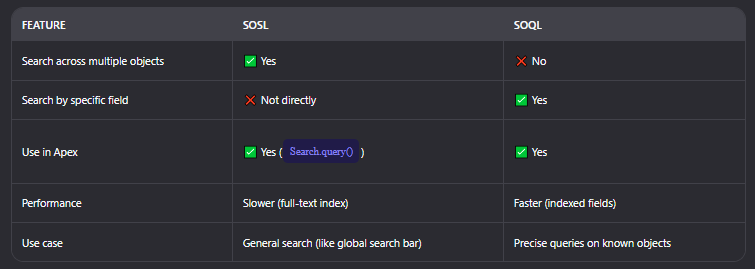
✅ Best Practices
- Use SOSL for user-driven searches (e.g., global search bar).
- Use SOSL when you’re unsure which object or field contains the data.
- Avoid SOSL for transactional logic or when performance is critical.
- Always sanitize input to avoid SOSL injection .
Some Interview Questions:
1. Fetch the top 5 contacts who have the most completed tasks in the last year, along with the count of those tasks
SELECT ContactId, COUNT(Id) taskCount
FROM Task
WHERE IsClosed = TRUE AND ActivityDate = LAST_N_DAYS:365
GROUP BY ContactId
ORDER BY taskCount DESC
LIMIT 5
2. Fetch those contacts who have no related task or event created in the last year
SELECT Id, Name
FROM Contact
WHERE Id NOT IN (
SELECT WhoId FROM Task WHERE CreatedDate = LAST_N_DAYS:365
) AND Id NOT IN (
SELECT WhoId FROM Event WHERE CreatedDate = LAST_N_DAYS:365
)
3. Fetch Accounts without any associated Opportunities/Contacts
SELECT Id, Name
FROM Account
WHERE Id NOT IN (SELECT AccountId FROM Opportunity)
AND Id NOT IN (SELECT AccountId FROM Contact)
Follow-up: Fetch accounts with at least one Opportunity or one Contact
SELECT Id, Name
FROM Account
WHERE Id IN (SELECT AccountId FROM Opportunity)
OR Id IN (SELECT AccountId FROM Contact)
4. What is the limitation of OFFSET in SOQL?
- The maximum value allowed for
OFFSETis 2,000 . - If you try to use
OFFSET > 2000, Salesforce throws an exception:INVALID_QUERY_LOCATOR.
5. Fetch the second highest Opportunity Amount associated with an Account
SELECT Amount
FROM Opportunity
WHERE AccountId = ‘001XXXXXXXXXXXX’
ORDER BY Amount DESC
LIMIT 1 OFFSET 1
6. Get the latest modified Opportunity/Contact associated with an Account
SELECT Id, Name, LastModifiedDate
FROM Opportunity
WHERE AccountId = ‘001XXXXXXXXXXXX’
ORDER BY LastModifiedDate DESC
LIMIT 1
SELECT Id, Name, LastModifiedDate
FROM Contact
WHERE AccountId = ‘001XXXXXXXXXXXX’
ORDER BY LastModifiedDate DESC
LIMIT 1
7. Count the number of related records associated with an Account
SELECT Id,
(SELECT COUNT() FROM Opportunities),
(SELECT COUNT() FROM Contacts)
FROM Account
WHERE Id = ‘001XXXXXXXXXXXX’
8. We want only accounts that have a related contact with the last name “Forbes.” How does the query work?
SELECT Id, Name
FROM Account
WHERE Id IN (
SELECT AccountId
FROM Contact
WHERE LastName = ‘Forbes’
)
9. How to call setup & non-setup objects DML in SOQL in a single transaction? (Note: Cannot use future or queueable.)
Salesforce doesn’t allow mixing setup (User, Profile, etc.) and non-setup (Account, Contact) object DMLs in the same transaction.
Solution : Use Flows or separate transactions via Queueable (if allowed). Since you can’t use async here, consider using Flow with fault tolerance , or restructure logic into multiple steps.
10. SOQL query to order contacts’ first names by their first characters? (Like A’s first names, then B’s and C’s, etc.)
SELECT FirstName, LastName
FROM Contact
ORDER BY FirstName ASC
11. SOQL query to fetch accounts without any contacts?
SELECT Id, Name
FROM Account
WHERE Id NOT IN (SELECT AccountId FROM Contact)
12. How to avoid MIXED_DML_ERROR without using asynchronous calls?
The MIXED_DML_OPERATION error occurs when mixing setup and non-setup object DMLs.
Solutions :
- Move setup object operations into a separate transaction .
- Use Flows (especially Record-Triggered Flow with separate fault paths).
- Use Separate Invocable Methods (but still needs async unless Flow).
14. Fetch only those accounts which have closed won opportunities
SELECT Id, Name
FROM Account
WHERE Id IN (
SELECT AccountId
FROM Opportunity
WHERE StageName = ‘Closed Won’
)
15. Describe how you would construct a dynamic SOQL query in Apex. What are the security considerations you should be aware of?
String query = ‘SELECT Id, Name FROM Account WHERE Industry = \” + industryVar + ‘\”;
List accs = Database.query(query);
Security Considerations :
- Prevent SOQL injection by sanitizing input.
- Use
String.escapeSingleQuotes()for user inputs. - Avoid concatenating raw strings directly from user input.
Follow-up: How would you approach a situation where a SOQL query needs to be modified frequently based on user input?
Strategies :
- Build modular query components (fields, filters, limits).
- Use
StringBuilderor helper methods to build query parts. - Use
Map<String, Object>to bind variables safely. - Apply input validation and whitelisting for field names/filters.
16. Explain the use of Database.query() in Apex for dynamic SOQL. How does it differ from static SOQL?
| Syntax | Inline in code | Built as String |
| Compile-time checks | Yes | No |
| Tooling support | Yes (e.g., VS Code autocomplete) | No |
| Query generation | Fixed | Flexible |
| Security | Less prone to injection | Requires escaping |
SQL Injection is when a malicious user manipulates input to alter the intended query behavior.
Prevention :
- Sanitize all user inputs using
String.escapeSingleQuotes(). - Avoid concatenation; prefer binding variables.
- Use
Schema.DescribeSObjectResultto validate field names. - Use whitelists for dynamic fields or filters.
17. Describe how you can query hierarchical data using SOQL. For example, querying all subordinates of a manager in a custom object representing an organizational structure
Assume a custom object Employee__c with a lookup to itself (Manager__c):
SELECT Id, Name
FROM Employee__c
WHERE Manager__c = ‘EMP001’
To go deeper levels (up to 5 levels), use recursive queries or batch Apex.
18. How can you perform a semi-join and anti-join in SOQL?
Semi-Join:
Find Accounts with at least one Closed Won Opportunity:
SELECT Id, Name
FROM Account
WHERE Id IN (
SELECT AccountId
FROM Opportunity
WHERE StageName = ‘Closed Won’
)
Anti-Join:
Find Accounts without any Opportunities:
SELECT Id, Name
FROM Account
WHERE Id NOT IN (
SELECT AccountId
FROM Opportunity
)
19. Describe how you would use polymorphic SOQL queries
Polymorphic fields like WhoId (Event, Task) or OwnerId can reference multiple sObjects.
Example:
SELECT Id, Subject, WhoId, WhatId
FROM Task
WHERE Who.Type = ‘Contact’
You can also filter by type: SELECT Id, Name, OwnerId, Owner.Type
FROM Case
WHERE Owner.Type = ‘User’
20. How do you handle querying large datasets that might exceed the governor limits?
Best Practices :
- Use
LIMITclause to limit results. - Use
OFFSETwisely (max 2000). - Use Batch Apex with
Database.QueryLocatorfor bulk processing. - Filter aggressively in WHERE clauses.
- Use indexed fields to optimize performance.
- Use
COUNT()instead of fetching full result sets.
21. What is LAST_N_DAYS:n?
Used to filter records within the last n days:
SELECT Id, Subject
FROM Task
WHERE ActivityDate = LAST_N_DAYS:30
 SFDCWallah
Leave a comment