What is Order of Execution in Salesforce?
A step by step process that determines how different process/tools will get executed when we perform DML operations
It ensures that everything is done is a specific order and nothing is missed
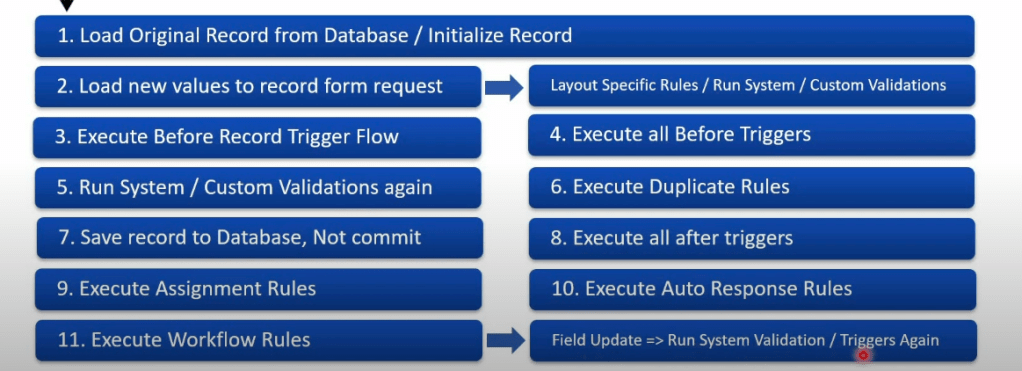

 Salesforce Order of Execution – Interview Questions with Answers
What happens if we update the same field in a before trigger and in a before flow?
 Answer: The value from the before trigger takes precedence and gets saved.
Can we update field values of the triggering record in an after record-triggered flow?
Answer: Technically yes, but it’s not a best practice. Updating the triggering record in an after flow can cause recursion and unexpected behavior.
Do changes to roll-up summary field values cause triggers to fire?
Answer: Yes, when a roll-up summary field updates, it can fire triggers on the parent object.
What will be the trigger context if it gets called again due to a workflow rule field update?
Answer: The trigger will fire again in the update context (either before or after depending on the logic).
Can we access related records’ data in trigger context variables?
Answer: No, trigger context (Trigger.new, Trigger.old) contains only the current record data. You must query related data explicitly.
What happens to auto-number fields if a transaction rolls back in Salesforce?
Answer: The auto-number value is skipped and not reused. The rolled-back record will not retain the auto-number.
What fires first: validation rule, before flow, or before trigger?
Answer: The before-save flow runs first, followed by the before trigger, and then the validation rules.
If a field update from a workflow rule changes a field that’s used in a validation rule, will the validation rule run again?
Answer: No. Validation rules run only once, before workflow rules and field updates are processed.
Can a Process Builder or Flow cause recursion with Apex triggers? How do you avoid it?
Answer: Yes, if they update the same object, they can cause recursion. Use static variables or check conditions to prevent it.
What’s the difference in execution between before-save flow and after-save flow?
Answer:
Before-save flow: Fast, runs before DML, can change field values.
After-save flow: Runs after DML, used for related records or actions like sending emails.
Can multiple before triggers (on different managed/unmanaged packages) conflict with each other?
Answer: Yes. Triggers don’t have a guaranteed order, so conflicts or unexpected behavior can occur if multiple triggers update the same field.
What’s the order of execution for: Before Trigger → Validation Rule → Workflow Rule → Process Builder → After Trigger → After Flow?
Answer:
Before-save flow
Before trigger
Validation rules
Duplicate rules
After-save flow
After trigger
Workflow rules & field updates
Process Builder
Assignment/auto-response/escalation rules
Post-commit logic (emails, async actions)
What are the key differences in order of execution between UI-based record save and DML-based record save from Apex?
Answer: UI save includes validation rules, assignment rules, workflows, etc.. Apex DML may bypass some rules if not explicitly invoked (e.g., assignment rules).
How do escalation rules, auto-response rules, and assignment rules fit into the order of execution?
Answer: They run after workflow rules and before DML is committed — generally toward the end of the order of execution.
When using an Apex class for platform event or CDC trigger, does it follow the standard order of execution?
Answer: No. Platform event and CDC triggers are asynchronous, and do not follow standard order of execution.
🔁 In what scenarios do flows and triggers both fire, and how can we avoid recursion between them?
✅ When Both Flows and Triggers Fire:
Flows and Apex Triggers can both execute during the same transaction when:
- A Flow performs a DML operation (e.g., creates/updates a record).
- The Flow is launched from:
- A Process Builder.
- A Record-Triggered Flow (introduced in Spring ’21).
- An Apex-invoked flow.
- That record change causes a trigger to fire.
- If the Flow or Trigger updates the same record again, it may re-trigger the other component — leading to recursion .
🔄 Example Scenario:
- A Flow updates a Contact.
- This update fires an Apex Trigger on Contact.
- The Trigger updates the associated Account.
- If there’s a Flow or Trigger on Account that touches the Contact again, you get recursion.
🛑 How to Avoid Recursion Between Flows and Triggers:
✔️ 1. Use Static Boolean Flags in Apex
Create a utility class with a static variable to track whether logic has already executed:
public class ExecutionGuard {
public static Boolean isAlreadyRun = false;
}
trigger MyContactTrigger on Contact (after update) {
if (!ExecutionGuard.isAlreadyRun) {
// Do your logic here
    // Prevent recursion
    ExecutionGuard.isAlreadyRun = true;

    // Update related records, call flow, etc.
}
}
Reset this flag at the end of the transaction or via Test.setMock() in tests.
✔️ 2. Use Custom Context Variables in Flows
Add a checkbox field like Is_Processed__c on the object. Set it to true when Flow runs, and filter future Flow/Trigger executions based on this field.
✔️ 3. Use Platform Events or Queueable Jobs for Async Processing
Move part of the logic to async context using:
- Platform Events – publish event from Flow or Apex, handle logic in an Event Trigger.
- Queueable Apex – offload updates outside the current transaction.
What’s the difference in execution order between standard save and DML operations from Apex?
| Order of Execution | Full Order of Execution including Validation Rules, Workflow Rules, Process Builders, Flows, and Triggers | Follows most of the same rules but skips some UI-specific steps |
| Governor Limits | Not applicable | Subject to governor limits |
| Recursion Control | More controlled by system | Requires manual control via flags/static variables |
| Trigger Context | System.TriggerOperationreflects correct type (insert, update, etc.) | Same, but called explicitly from Apex |
| Rollback Behavior | Can be rolled back manually (e.g., in Flow or Process Builder) | Rollback viaDatabase.rollback(savepoint)only |
| Field History Tracking | Yes | Yes |
| Validation Rules | Enforced | Enforced |
⚠️ Important Note:
If you use Database.insert(record, false); (i.e., partial success), no exceptions will be thrown even if some records fail.
What order is followed in Delete and Undelete Operation?
🗑️ Delete Operation Order:
- Before Delete Trigger
- Any before delete logic from declarative tools (e.g., flows)
- System checks (e.g., referential integrity)
- After Delete Trigger
- Record is moved to Recycle Bin
- If cascade delete , child records are deleted accordingly
❗ Note: You cannot access the record in
after deletetrigger usingTrigger.new, onlyTrigger.old.
♻️ Undelete Operation Order:
- Before Undelete Trigger
- Record is restored from Recycle Bin
- After Undelete Trigger
- Child records (if soft-deleted via cascade delete) are also undeleted
❗ Undelete does not restore files, events, tasks, or activity history unless they were explicitly undeleted too.
 SFDCWallah
Leave a comment