Lightning Web Components (LWC) is a framework for creating custom web components using HTML, JavaScript, and CSS. It is based on the web standards for web components and supports modern browsers and IE 11.
However, there are two versions of LWC that you should be aware of: LWC OSS and LWC in Salesforce. These are two technologies that enable you to use LWC in different contexts and platforms.
In this post, we will know what LWC OSS and LWC in Salesforce are, how they differ from each other, and what are the pros and cons of each one.
What is LWC OSS?
LWC OSS stands for Lightning Web Components Open Source, which is a framework for creating custom web components using HTML, JavaScript, and CSS.
It is a lightweight layer on top of the native web components that provides some additional features and benefits, such as:
- A declarative syntax for defining components using HTML templates
- A reactive data binding system that automatically updates the UI when the data changes
- A set of decorators that simplify common tasks such as accessing the DOM, defining properties and attributes, handling events, and connecting to services
- A collection of base components that provide common UI elements such as buttons, icons, inputs, etc.
- A testing framework that allows you to write unit tests and integration tests for your components
- A tooling ecosystem that includes a CLI, a VS Code extension, a playground, and a documentation site
You can use LWC OSS to create web applications that run on any platform, such as Heroku, AWS, or your own server. You can also use any CSS framework or library of your choice to style your components.
What is LWC in Salesforce?
LWC in Salesforce is the framework for creating web components on the Lightning Platform.
It is based on the same core technology as LWC OSS, but it provides some features and benefits that are specific to the platform, such as:
- A synthetic version of shadow DOM, which creates a virtual DOM as an in-memory representation of the DOM. This allows it to support older browsers that do not fully support native shadow DOM.
- Some base components that are specific to the Lightning Platform, such as
lightning-datatable,lightning-record-form,lightning-card, etc. These components leverage some platform features such as Lightning Data Service, UI API, SLDS, etc. - Some decorators that are specific to the Lightning Platform, such as
@wire,@api,@track, etc. These decorators allow you to access data or metadata from the platform or communicate with other components on the page. - Aura as the underlying framework for rendering components on the page. Aura provides some features such as event bubbling, component lifecycle hooks, error handling, etc.
You can use LWC in Salesforce to create web applications that run on Salesforce Platform. You can also use SLDS or custom CSS to style your components.
How do they differ from each other?
LWC OSS and LWC in Salesforce are based on the same core technology, but they have some differences that you should be aware of.
Here is a table that summarizes some of the differences between them:
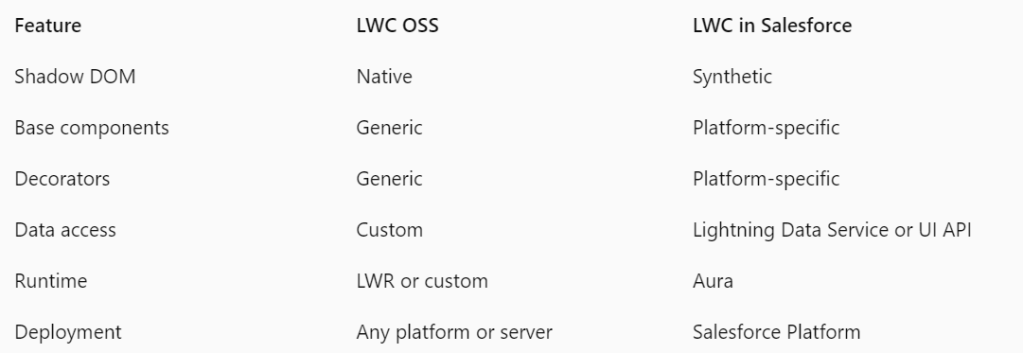
As you can see from the table, LWC OSS and LWC in Salesforce have different trade-offs and advantages depending on your use case and preferences.
Pros of LWC OSS:
- It aligns with web standards and is open source, which means that you can contribute to the framework and shape its future.
- It uses native shadow DOM by default, which provides better encapsulation and performance.
- It allows you to use any CSS framework or library of your choice to style your components.
- It allows you to use any backend service or API of your choice to fetch or update data.
- It allows you to deploy your web applications on any platform or server.
Cons of LWC OSS:
- It does not include some base components or features that are specific to the Lightning Platform.
- It does not include some decorators or features that are specific to the Lightning Platform.
- It does not use Aura or its features for rendering components on the page.
- It requires you to handle some aspects such as authentication, authorization, security, etc. on your own.
Pros of LWC in Salesforce:
- It provides some base components or features that are specific to the Lightning Platform, such as Lightning Data Service, UI API, SLDS, etc.
- It provides some decorators or features that are specific to the Lightning Platform, such as
@wire,@api,@track, etc. - It uses Aura or its features for rendering components on the page, such as event bubbling, component lifecycle hooks, error handling, etc.
- It handles some aspects such as authentication, authorization, security, etc. for you.
Cons of LWC in Salesforce:
- It does not align with web standards and is not open source, which means that you cannot contribute to the framework or shape its future.
- It uses a synthetic version of shadow DOM, which creates a virtual DOM as an in-memory representation of the DOM. This may affect performance and compatibility.
- It limits you to use SLDS or custom CSS to style your components.
- It limits you to use Lightning Data Service or UI API to fetch or update data.
- It limits you to deploy your web applications on Salesforce Platform.
Conclusion:
LWC OSS and LWC in Salesforce are two technologies that enable you to use Lightning Web Components, a framework for creating custom web components using HTML, JavaScript, and CSS.
They allow you to create web applications that run on different platforms and contexts, using different stacks and tools.
Depending on your use case and preferences, you may choose one over the other.
However, you should also be aware of the differences and trade-offs between them.
 SFDCWallah
Leave a comment