Client Side Controller Handle:
- myAction: function(componet,event,helper){}
- component or cmp: the component to which the controller belongs
- event: the event that the action is handling
- helper: which is optional. Helper methods do such as processing data & firing server-side actions. These functions can be called from controller/helper function
Fetching Data From Apex Controller in LEX Component:
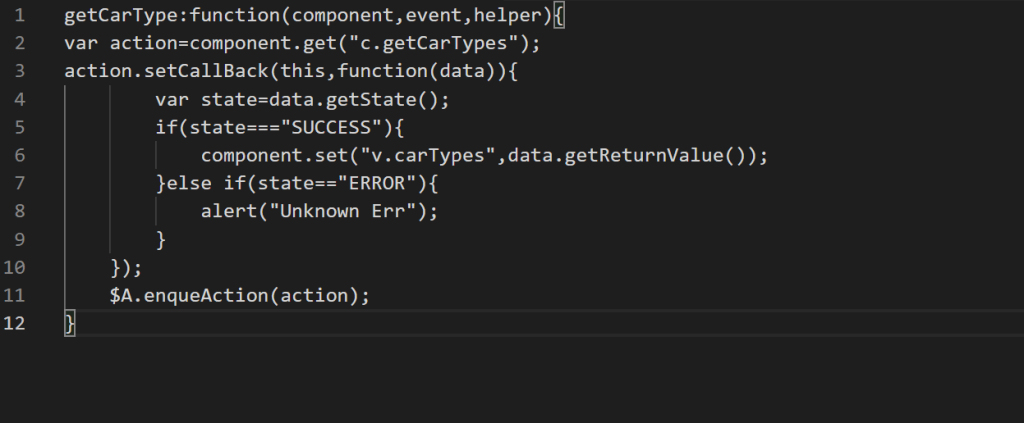
- Server side controller can be called from client side controller or helper to perform server side.
- We can’t call directly the server side controller.
- @AuraEnabled annotation is used to make function available for LEX component.
- This function must be public or global and must be static.
- In LEX component there will be only one apex controller.
- Enqueue action put your actions in the queue which helps in reducing the network traffic by batching multiple server side calls in one request.
Inheritance In LEX Components:
- Inheritance in lightning allows you to inherit parent component’s attributes, body attributes, events, helper and client side controller.
- To make a parent component inheritable, set extensible=”true”
- <aura: component extensible=”true” />
- To extends parent component:
- <aura: component extends=”c: parentComponentName” />
- B extends A so A is super component and B is sub component.
- If one component is using other component in it so it’s parent-child components.
To Use A Component In A Lightning App:
- First create a Lightning Page and add your component into that page.
- Now create your lightning app from App Manager and while creating select lightning page you have created and it’s done.
- LDS handles sharing rules and FLS for you.
- If targetRecord is used it will have relationship and recordtype info also but not with targetFields.
Lightning Events:
- System Events:
- Init: Fired when component markup has initiated but before the markup in the component has rendered.
- <aura: handler name=”init” value=”this” action=”{!c.doInit}” />
- Render: Fired after init and when markup of component is rendered completely or re-rendered.
- <aura: handler name=”render” value=”this” action=”{!c.onRender}” />
- Init: Fired when component markup has initiated but before the markup in the component has rendered.
- Custom Events:
- Component Event: These events are handled by component itself or the parent components. Child component can’t handle this event. Data flows only between parent and child components.
- Application Event: These events can be handled by any component in your application. It’s similar to publish-subscribe model. All the components who are subscribed to an event will be alerted when the event is fired.
Aura Method:
It’s a way to pass values from parent component to child component. Parent component can call the method of child component. Child component will declare the aura:method and parent component will find that component method using aura:id.
It has 3 attributes:
- name(String): method name
- action: the client side controller action to execute(in child)
- access: global or public
- https://developer.salesforce.com/docs/atlas.en-us.lightning.meta/lightning/ref_tag_method.htm
Lightning Data Service:
https://xperiencepartage.wordpress.com/2018/12/24/lightning-data-service
Lightning Components Best Practice:
https://xperiencepartage.wordpress.com/2019/02/07/lightning-component-best-practices
Difference Between Lightning Componets And Visualforce Pages:
Gaps Between Salesforce Classic and Lightning Experience:
 SFDCWallah
Leave a comment