1. What is provided out of the box? how much customization can we do in this?
Einstein Opportunity Insights
It provides relevant updates about opportunities so we can win more deals. Opportunity Insights includes predictions about which deals are likely to be won, reminders to follow up, and notifications when key moments in a deal take place. Each insight offers details about why it’s shown, tying it to relevant metrics.
Available in: Lightning Experience
Available with Sales Cloud Einstein
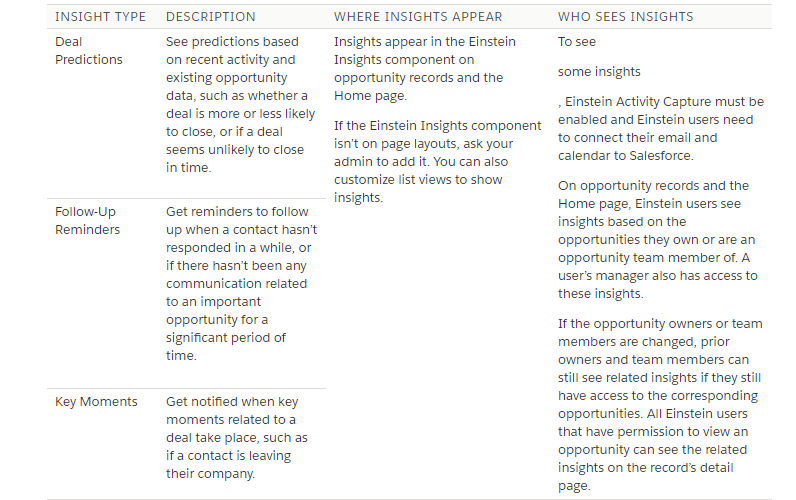
We need to add the Assistant Standard Lightning Component on to the Home Page and Einstein Insights Standard Lightning Component on to the record pages. After enabling the opportunity insights and required data it takes 24 hours to show the insights.
Einstein Activity Capture is not required for Opportunity Insights. It is recommended, if we want to get insights after connecting our email and calendar so it will fetch some information from our email and calendar and show insights about the deal predictions and reminders.
How much customization can we do in this?
It shows the Insights automatically with the related activity we can just control the component visibility with the filters, for example we don’t want to show insights for particular user or on the basis of field filters. We can’t include any field on the insights.
2. What is required to get full benefits – example is Einstein Activity Capture Required?
Data Considerations:
https://help.salesforce.com/articleView?id=einstein_sales_considerations.htm&type=5
Einstein Lead Scoring
- At least 1,000 leads must be created in the last 6 months.
- Of the leads created in the last 6 months, at least 120 must be converted.
- Of the leads created in the last 6 months, at least 120 should be converted to an account and contact.
- Of the leads created in the last 6 months, at least 120 should be converted to an account and contact with an opportunity created at conversion time.
Einstein Opportunity Insights
- You must work with opportunities in Salesforce for at least 3 months.
- At least 3 opportunities must be closed in each of the last 6 months.
- At least 10 different active users must own opportunities that were created in the last 6 month.
- Median lifespan of closed opportunities should be more than 7 days in the last 2 years.
- At least 20 percent of opportunities that were created in the last month should be open.
- The Amount field should be populated in at least 50 percent of open opportunities.
Einstein Account Insights
- You must have at least 30 business accounts.
Einstein Automated Contacts
- You must have at least 30 business accounts.
- If you use person accounts, at least 50 percent of accounts must be business accounts.
- The Website field should be populated in at least 30 percent of accounts.
- At least 30 percent of accounts should have one or more related contacts.
Einstein Activity Capture
- You must have at least 30 accounts, contacts, leads, or opportunities.
Einstein Opportunity Scoring
- You must work with opportunities in Salesforce for at least 12 months.
- At least 1,000 opportunities must be closed in the last 2 years.
- Median lifespan of closed opportunities should be more than 7 days in the last 2 years.
- Closed opportunities must include both closed-won and closed-lost in the last 2 years.
- The Amount field should be populated in at least 50 percent of open opportunities in the last 2 years.
Einstein Forecasting
- Collaborative Forecasts must be enabled.
- You must forecast by month, not by quarter.
- You must use a standard fiscal year. Standard fiscal years follow the Gregorian calendar, but can start on the first day of any month of the year.
- Forecasts must be measured by opportunity revenue.
- You must have at least one forecasting enabled user that reports to a forecast manager.
- You must work with opportunities in Salesforce for at least 24 months.
- The Amount field should be populated in at least 50 percent of open opportunities in the last 2 years.
- Opportunity Splits is not enabled.
TIP To check whether you meet the data requirements, run the Sales Cloud Einstein Readiness Assessor. It will generate a report in that we can check that it is ready for insights for various objects.
Einstein Activity Capture is not required for Opportunity Insights. It is recommended, if we want to get insights after connecting our email and calendar (Full Benefits) so it will fetch some information from our email and calendar and show insights about the deal predictions and reminders. Like it shows that opportunity close date is overdue so for this kind of information we have no need to enable Einstein Activity Capture, it automatically shows that. It shows Account related Insights also without enabling the Einstein Activity Capture.
To enable the Einstein Activity Capture we need to sign an order form and raise a ticket with Salesforce. If you are directly getting the option to enable it then it is not needed. Then you just need to connect your email and calendar with Salesforce.
3.Can we hide/show einstein insights component?
There is no Standard Expand button, We can hide the Insights details by double click on it.
And we can hide the Einstein Insights Standard Component for the particular user using filters in Lightning App Builder. We can show / hide using Top Insight field also.
Follow below link to enable opportunity insights
https://wordpress.com/post/xperiencepartage.wordpress.com/591
 SFDCWallah
Leave a comment