In the last post of this series, we covered the nifty performance upgrades and quality-of-life features that Lightning Data Service provides. Now let’s learn how to use them.
Loading Records
- Remember, force:recordData doesn’t inherently include any UI elements.
- The force:recordData tag is just the logic used to communicate with the server and manage the local cache.
- For your users to view and modify the data fetched by LDS, you have to include UI elements like InputText or OutputText.
Here is a simple example of loading a record using lightning data service.
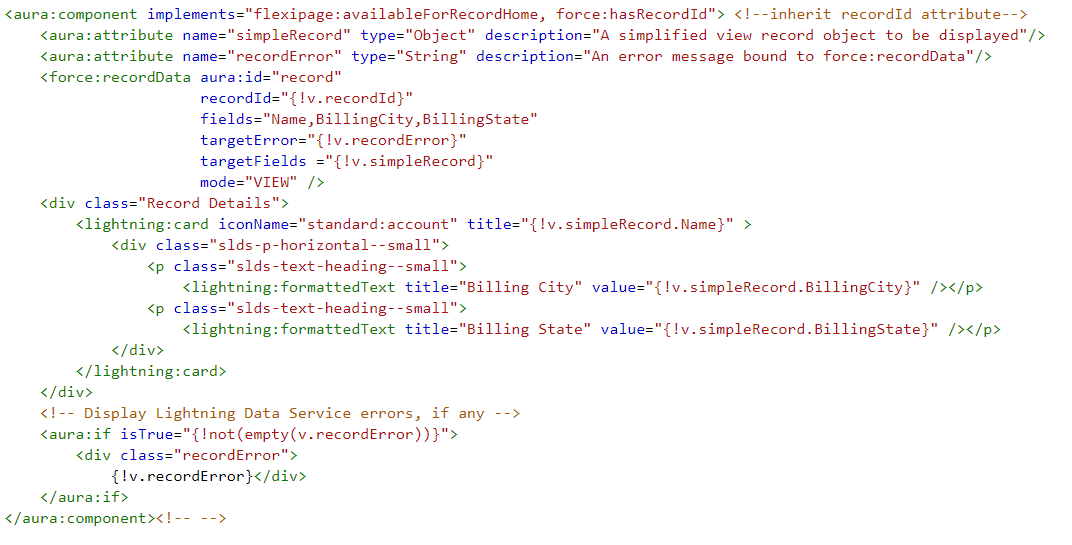
In this code you can see i didn’t use the targetRecord Attribute and it is working fine.
No need to code in controller of this component.
- This component can be added to a record home page in the Lightning App Builder, or as a custom action.
- The record ID is supplied by the implicit recordId attribute added by the force:hasRecordId interface.
 SFDCWallah
Leave a comment