- Using scheduled apex you can run apex classes at a specified time.
- This is ideal for daily or weekly maintenance tasks using Batch Apex.
Scheduled Apex Syntax
- First implement the Schedulable interface for the class.
- Then, schedule an instance of the class to run at a specific time using the System.schedule method.
- There is only one execute method in Scheduleable Interface.

You can schedule your class to run either programmatically or from the Apex Scheduler UI.
Prgrammatically:
RemindOpptyOwners reminder = new RemindOpptyOwners();
// Seconds Minutes Hours Day_of_month Month Day_of_week optional_year
String sch = ’20 30 8 10 2 ?’;
String jobID = System.schedule(‘Remind Opp Owners’, sch, reminder);
Important Points
- The System.Schedule method uses the user’s timezone for the basis of all schedules, but runs in system mode—all classes are executed, whether or not the user has permission to execute the class.
- Use extreme care if you’re planning to schedule a class from a trigger.You must be able to guarantee that the trigger won’t add more scheduled jobs than the limit.
- The System.Schedule method takes three arguments:

Scheduling a Job from the UI:
- From Setup, enter Apex in the Quick Find box, then select Apex Classes.
- Click Schedule Apex
- Enter Job Name
- Select the Apex Class from lookup
- Select Weekly or Monthly for the frequency and set the frequency desired.
- Select the start and end dates, and a preferred start time.
- Click Save

Important Points for Scheduled Apex:
- Synchronous Web service callouts are not supported from scheduled Apex.
- To be able to make callouts, make an asynchronous callout by placing the callout in a method annotated with @future(callout=true) and call this method from scheduled Apex.
- If your scheduled Apex executes a batch job, callouts are supported from the batch class.
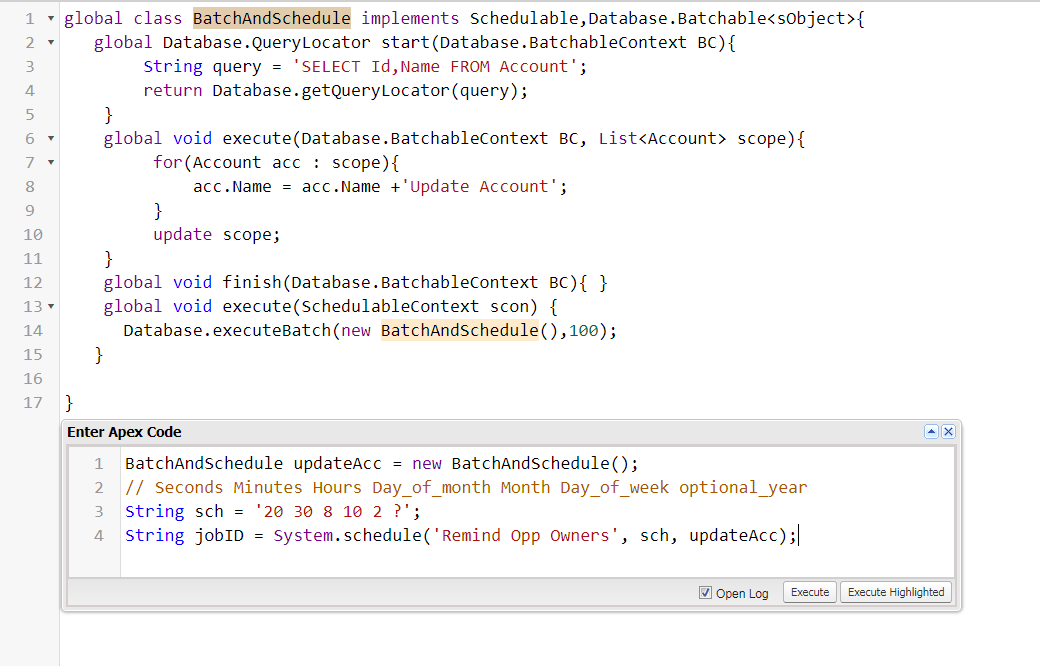
We can write both Batch and Scheduled in one class as both are interface we can implement more then one interface in one class which is basically known as multiple inheritance . For example:
Testing Schedule Apex:
Use Test.startTest() and Test.stopTest() again around the System.schedule method, to ensure processing finishes before continuing your test.
For Example:

If anything is mentioned wrong by me then please suggest me in comments.
 SFDCWallah
Leave a comment