As we know future methods have some limitations:
- Parameters passed in future methods can be only of Primitive type(like Integer,String)
- Cannot chain @future method(means future inside future)
- Cannot get the job ID
- The getContent() and getContentAsPDF() methods can’t be used in methods with the future annotation.
Queueable Apex overcome all the limitations of future method like:
- Chaining jobs
- Asynchronous monitoring (it gets job ID)
- Using non-primitive types(we can use sObjects like Accounts,Contacts etc.)
- The getContentAsPDF() methods can use in Queueable Apex.
- Monitoring of jobs
Why we are using Queueable Apex instead of Batch Apex:
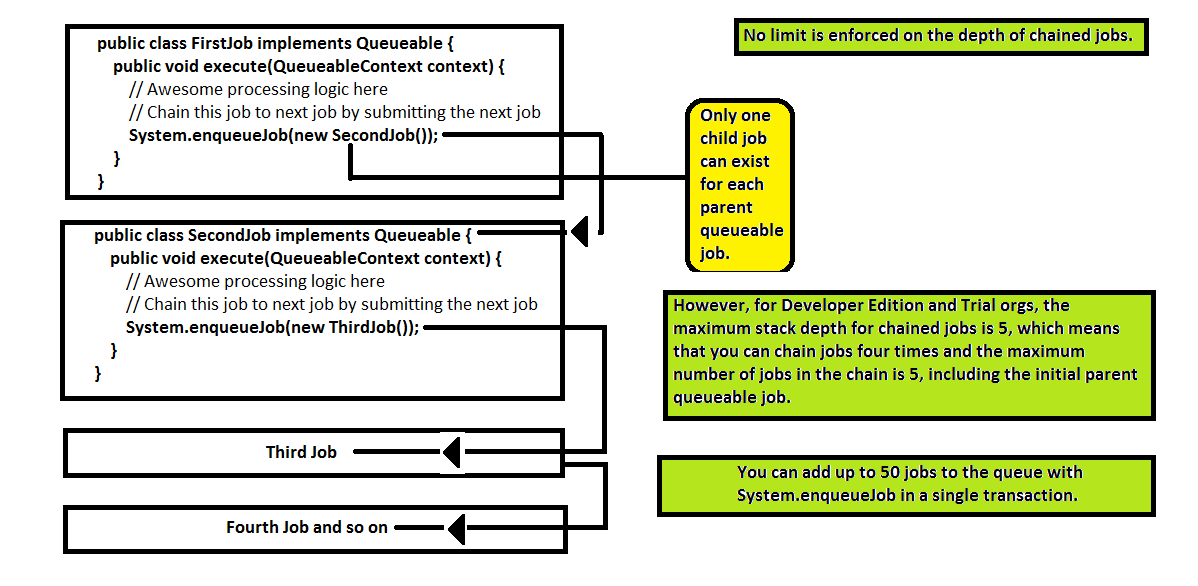
- Only 5 concurrent batch can run at a time but in Queueable Apex you can add up to 50 jobs to the queue with System.enqueueJob in a single transaction.
- Execution may be delayed based on server availability in batch apex.
- @future methods are not allowed in batch apex.
- Can’t use getContent/getContentAsPDF methods in batch apex.
- More control on jobs in Queueable Apex.
Queueable Apex works exactly like @future method but with extra power.
Sample Queueable Apex:

To add this class as a job on the queue, execute the following code:

You can use the new job ID to monitor progress, either through the Apex Jobs page or programmatically by querying AsyncApexJob:
SELECT Id, Status, NumberOfErrors FROM AsyncApexJob WHERE Id = :jobID
Chaining of Jobs:
Testing Queueable Apex
- It looks very similar to Batch Apex testing. To ensure that the queueable process runs within the test method, the job is submitted to the queue between the Test.startTest and Test.stopTest block.
- You can’t chain queueable jobs in an Apex test, doing so results in an error.
- To avoid nasty errors, you can check if Apex is running in test context by calling Test.isRunningTest() before chaining jobs.
 SFDCWallah
Leave a comment