Batch Apex
- Batch Apex is used to run large jobs (think thousands or millions of records!) that would exceed normal processing limits.
- Using Batch Apex, you can process records asynchronously in batches (hence the name, “Batch Apex”) to stay within platform limits.
- If you have a lot of records to process, for example, data cleansing or archiving, Batch Apex is probably your best solution.
- Let’s say you want to process 1 million records using Batch Apex.
- The execution logic of the batch class is called once for each batch of records you are processing.
- Each time you invoke a batch class, the job is placed on the Apex job queue and is executed as a discrete transaction.
- Every transaction starts with a new set of governor limits, making it easier to ensure that your code stays within the governor execution limits.
- If one batch fails to process successfully, all other successful batch transactions aren’t rolled back.


Batch Apex Syntax
Your class must implement the Database.Batchable interface and include the following three methods:
Start,Execute and Finish
Start
- This method collects the records or objects to pass the records to the execute method for processing.
- This method is called once at the beginning of a Batch Apex job
- This method uses either a Database.QueryLocator object or an Iterable that contains the records or objects passed to the job.
- With the QueryLocator object,total no. of records retrieved by SOQL query is upto 50 million records.
- With the Iterable,the normal limit applies means 50000 records you can fetch using Iterable.
Execute
- Performs the actual processing for each chunk or “batch” of data passed to the method.
- The default batch size is 200 records. Maximum batch size is 2000.
- Batches of records are not guaranteed to execute in the order they are received from the start method.
- It takes two arguments:
- A reference to the Database.BatchableContext object.
A list of sObjects, such as List, or a list of parameterized types.
Finish
- Used to execute post-processing operations (for example, sending an email) and is called once after all batches are processed.
- We can’t create a batch class without finish method because we are using the Database.Batchable interface and all the methods are mandatory to use while using interface.This concept is same as we use interface in Java.
Sample Batch Class:

Calling Batch Class:
MyBatchClass myBatchObject = new MyBatchClass();
Id batchId = Database.executeBatch(myBatchObject);
Database.QueryLocator:
50 Million records can be returned.
Iterable:
- Governor limits will be enforced. So, we can use up to 50,000 records only. Else, exception will be thrown.
- You can also use the Iterable to create your own custom process for iterating through the list.
- The biggest difference is probably that an Iterable can loop over aggregate queries.
Best Practices and important points:
- Only use Batch Apex if you have more than one batch of records.
- Batch Apex is typically stateless.
If you specify Database.Stateful in the class definition, you can maintain state across all transactions. - With the Apex flex queue, you can submit up to 100 batch jobs.
- Up to 5 batch jobs can be queued or active concurrently.
- Can’t use getContent/getContentAsPDF methods.
- We can call a batch class from trigger:
trigger callbatchapex on Account (after insert) {
List accList = new List();
for(account acc : trigger.new){
if(acc.annualrevenue < 20000) accList.add(acc); } if(accList.size() > 0)
database.executebatch(new BatchApexDemo(),200);
} - Use extreme care if you are planning to invoke a batch job from a trigger. You must be able to guarantee that the trigger won’t add more batch jobs than the limit.
- A batch class can’t call a @future but can call a webservice so indirectly we can call future method using webservice.
- We can call a batch class inside another batch class.We need to call batch class in finish method of first batch class.If we need to call other batch class in execute method then we need to use Queueable class.
- Call the batch class inside Test.startTest() and Test.stopTest();
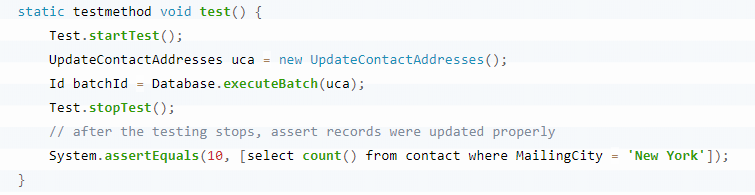
- Make sure that the number of records inserted in test class is less than the batch size of 200 because test methods can execute only one batch total.
- Write more accurate SOQL query to gather the records.
- Minimize the number of asynchronous requests created to minimize the chance of delays.
Using Callouts in Batch Apex
To use a callout in batch Apex, specify Database.AllowsCallouts in the class definition. For example:
global class SearchAndReplace implements Database.Batchable<sObject>,Database.AllowsCallouts{
}
 SFDCWallah
Leave a comment