- Sometimes we need to mention community url to give access to the community user.We can use community url and other fields values provided by salesforce.
- Community email templates have merge fields unique to communities.
- You can find them under the Network Member Fields field type.
- You can also use other merge field types, such as Receiving User and Organization.
- Here are a few merge fields commonly used in Community HTML email templates
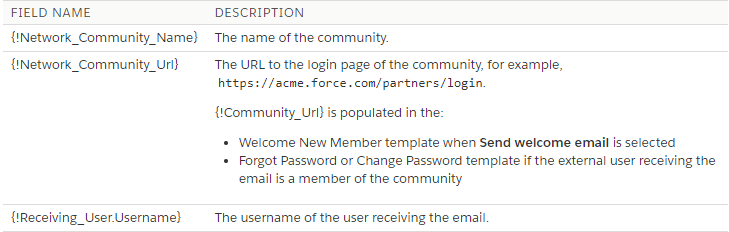
- For more flexibility, you can create custom Communities email templates in Visualforce.
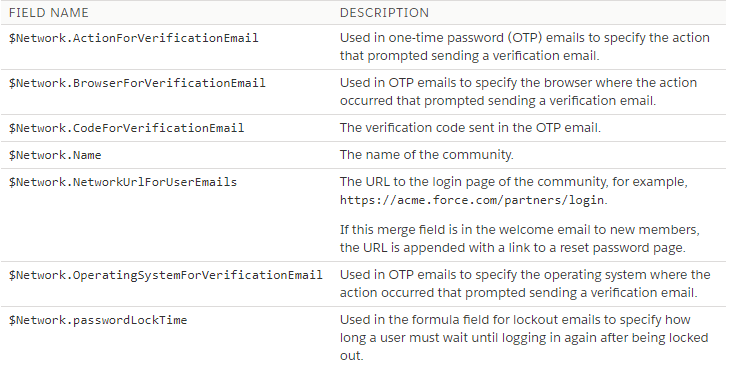
- For a Visualforce email template, use the $Network global merge field type and its properties, as described in this table.
- These fields are populated only in Visualforce Communities email templates.
- If the user receiving the email is a member of multiple active communities, the link goes to the oldest active community.
- If the user is already logged in to a community and clicks the link in the email, the link goes to that community.
- If the user is not a member of any community, the link goes to the internal org.
If the user is a member of a portal and a community, the link goes to the community. - To insert merge fields into your Communities email templates,
- From Setup, enter Email Templates in the Quick Find box, and select Classic Email Templates. Next to an email template, click Edit.
- Under Available Merge Fields, from the drop down menu, select the field type, and then select the field. For merge fields specific to communities, select Network Member Fields.
-
Copy the merge field value into the body of the email template.
- Comment
- Reblog
-
Subscribe
Subscribed
Already have a WordPress.com account? Log in now.
 SFDCWallah
Leave a comment