Standard controllers can provide all the functionality you need for a Visualforce page because they include the same logic that is used for a standard page. For example, if you use the standard Accounts controller, clicking a Save button in a Visualforce page results in the same behavior as clicking Save on a standard Account edit page.
However, if you want to override existing functionality, customize the navigation through an application, use callouts or Web services, or if you need finer control for how information is accessed for your page, you can write a custom controller or a controller extension using Apex:
Custom Controller
- A custom controller is an Apex class that implements all of the logic for a page without using the functionality of a standard controller.
- Use custom controllers when you want your Visualforce page to run entirely in system mode, which does not enforce the permissions and field-level security of the current user.
- A custom controller is an Apex class that uses the default, no-argument constructor for the outer, top-level class. You cannot create a custom controller constructor that includes parameters.
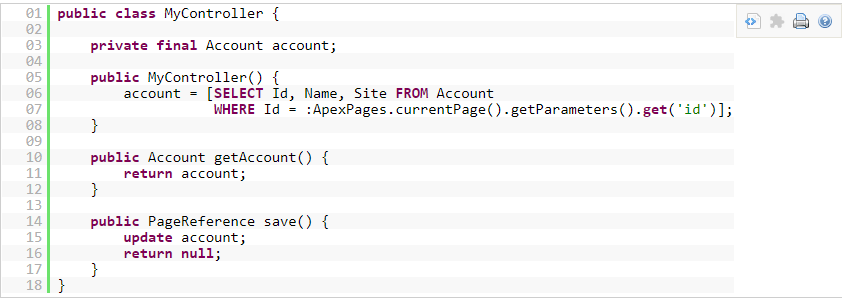
A custom controller can also be used to create new records. For example:
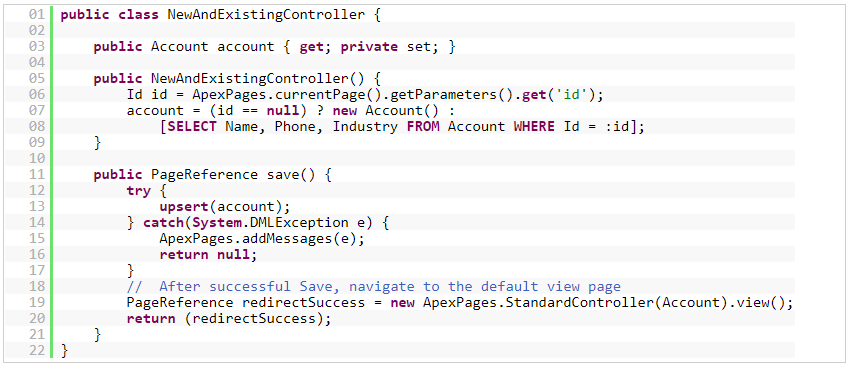
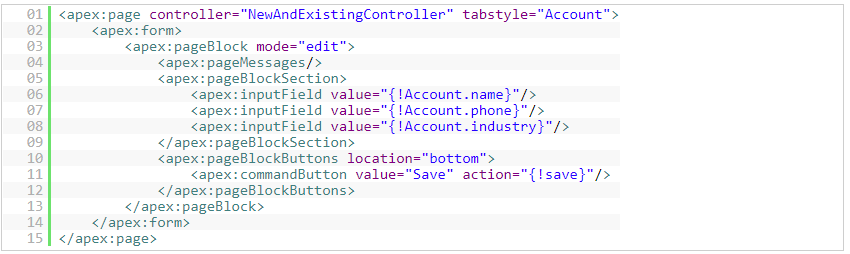
- Like other Apex classes, all custom controllers run in system mode. Consequently, the current user’s credentials are not used to execute controller logic, and the user’s permissions and field-level security do not apply.
- You can choose whether a custom controller respects a user’s organization-wide defaults, role hierarchy, and sharing rules by using the with sharing keywords in the class definition.
Controller Extensions
- A controller extension is an Apex class that extends the functionality of a standard or custom controller.
- Controller extension is any Apex class containing a constructor that takes a single argument of type ApexPages.StandardController or CustomControllerName, where CustomControllerName is the name of a custom controller you want to extend.
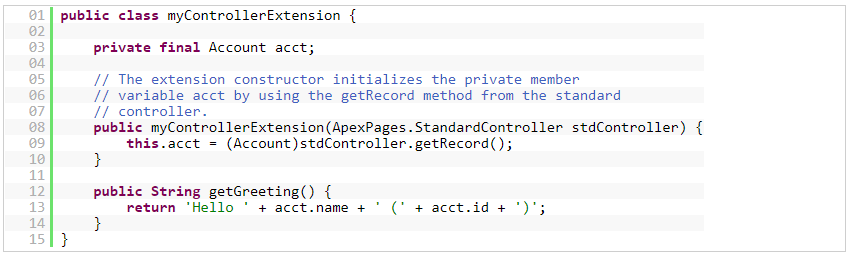
- Multiple controller extensions can be defined for a single page through a comma-separated list. This allows for overrides of methods with the same name. For example, if the following page exists:



- The value of the <apex:outputText> component renders as foo-One. Overrides are defined by whichever methods are defined in the “leftmost” extension, or, the extension that is first in the comma-separated list. Thus, the getFoo method of ExtOne is overriding the method of ExtTwo.
- Use Controller Extensions when:
- You want to leverage the built-in functionality of a standard controller but override one or more actions, such as edit, view, save, or delete.
- You want to add new actions.
- You want to build a Visualforce page that respects user permissions. Although a controller extension class executes in system mode, if a controller extension extends a standard controller, the logic from the standard controller does not execute in system mode. Instead, it executes in user mode, in which permissions, field-level security, and sharing rules of the current user apply.
- Controller extensions run in system mode.
- However, if a controller extension extends a standard controller, it executes in user mode, in which the permissions, field-level security, and sharing rules of the current user apply.
- You can choose whether a controller extension respects a user’s organization-wide defaults, role hierarchy, and sharing rules by using the with sharing keywords in the class definition.
Please share your suggestions and view in comments.
 SFDCWallah
Leave a comment