Visualforce:
- Visualforce is a framework that allows developers to build sophisticated, custom user interfaces that can be hosted natively on the Lightning platform. The Visualforce framework includes a tag-based markup language, similar to HTML, and a set of server-side “standard controllers” that make basic database operations, such as queries and saves, very simple to perform.
- Visualforce is based on MVC framework
- Working Model of Visualforce
User requests a page
The server executes the page’s underlying code and sends the resulting HTML to the browser
The browser displays the HTML
When the user interacts with the page, return to step one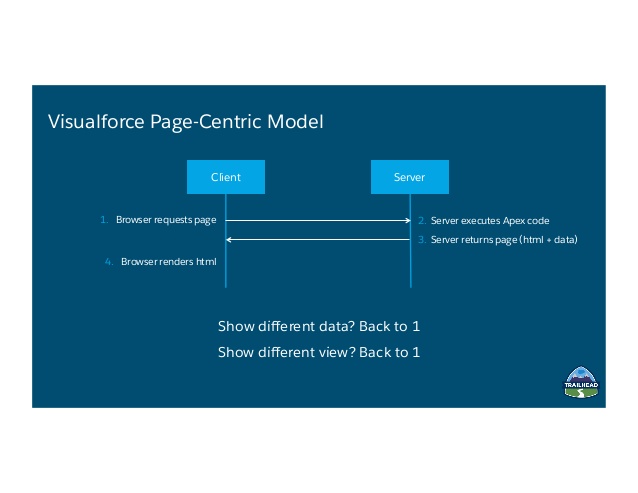
- Most of the work is done on the server.
- JavaScript buttons and links are supported
- Primarily for Desktop
- My domain is not required
UI Generation
Server-side
Data and Business Logic
Apex standard or custom controller
Pros
Tried and true model
Easy to implement for greater productivity
Naturally splits large applications into small, manageable pages
Has built-in metadata integration
Caveats
Limited interactivity (aside from added JavaScript functionality)
Higher latency, which degrades mobile performance
Visualforce is conceptually similar to other page-centric technologies like PHP, ASP, JSP, and Ruby on Rails. Salesforce’s rich metadata infrastructure makes Visualforce a productive solution. The standard controller makes it easy to access objects directly and via relationships without executing a single query.
Lightning Components:
- Lightning is the collection of tools and technologies behind a significant upgrade to the Salesforce platform. Lightning includes:
- Experience: A set of modern user interfaces optimized for speed. This includes the Lightning Experience, Salesforce1 Mobile app and template-based communities.
Lightning Component Framework: A JavaScript framework and set of standard components that allow you to build reusable components to customize the Lightning Experience, Salesforce1 Mobile app and template-based communities and build your own standalone apps. - Visual Building Tools: Drag-and-drop technologies for fast and easy app building & customizations. Use the Lightning App Builder to customize the Lightning Experience and Salesforce1 Mobile app. Use the Community Builder to customize template-based communities.
- Lightning Exchange: A section of the AppExchange where you can find 70+ partner components to jumpstart your development.
- Lightning Design System: Style guides and modern enterprise UX best practices to build pixel perfect apps that match the look and feel of the Lightning Experience and Salesforce1 Mobile app.
- Lightning is based on component-based framework.
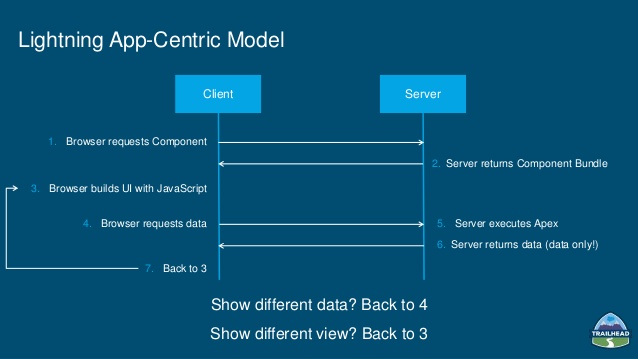
- Working Model of Lightning Components
The user requests an application or a component
The application or component bundle is returned to the client
The browser loads the bundle
The JavaScript application generates the UI
When the user interacts with the page, the JavaScript application modifies the user interface as needed (return to previous step)
- Primarily for Mobile View
- My domain is required to use Lightning Components.
- Aura is the open source technology that powers Lightning Components. The aura: namespace contains all of the basic building blocks for defining components and applications.
UI Generation
Client-side (JavaScript)
Data and Business Logic
Lightning Data Services, Apex controller
Pros
Enables highly interactive and immersive user experiences
Aligns with Salesforce user interface strategy
Built on metadata from the foundation, accelerating development
Both the Force.com IDE and the Developer Console support Lightning components, providing an integrated developer experience
Caveats
Steeper, longer learning curve compared to Visualforce
Higher complexity than Visualforce—you’re building an application, not a page
Since Lightning components are new, there are still some features that aren’t supported
There are a limited number of out-of-the-box components
 SFDCWallah
Leave a comment